The EUREKA ERGONOMIC Height Adjustable Computer Tower Stand review is for desktop owners who need more than a simple platform for a PC case.
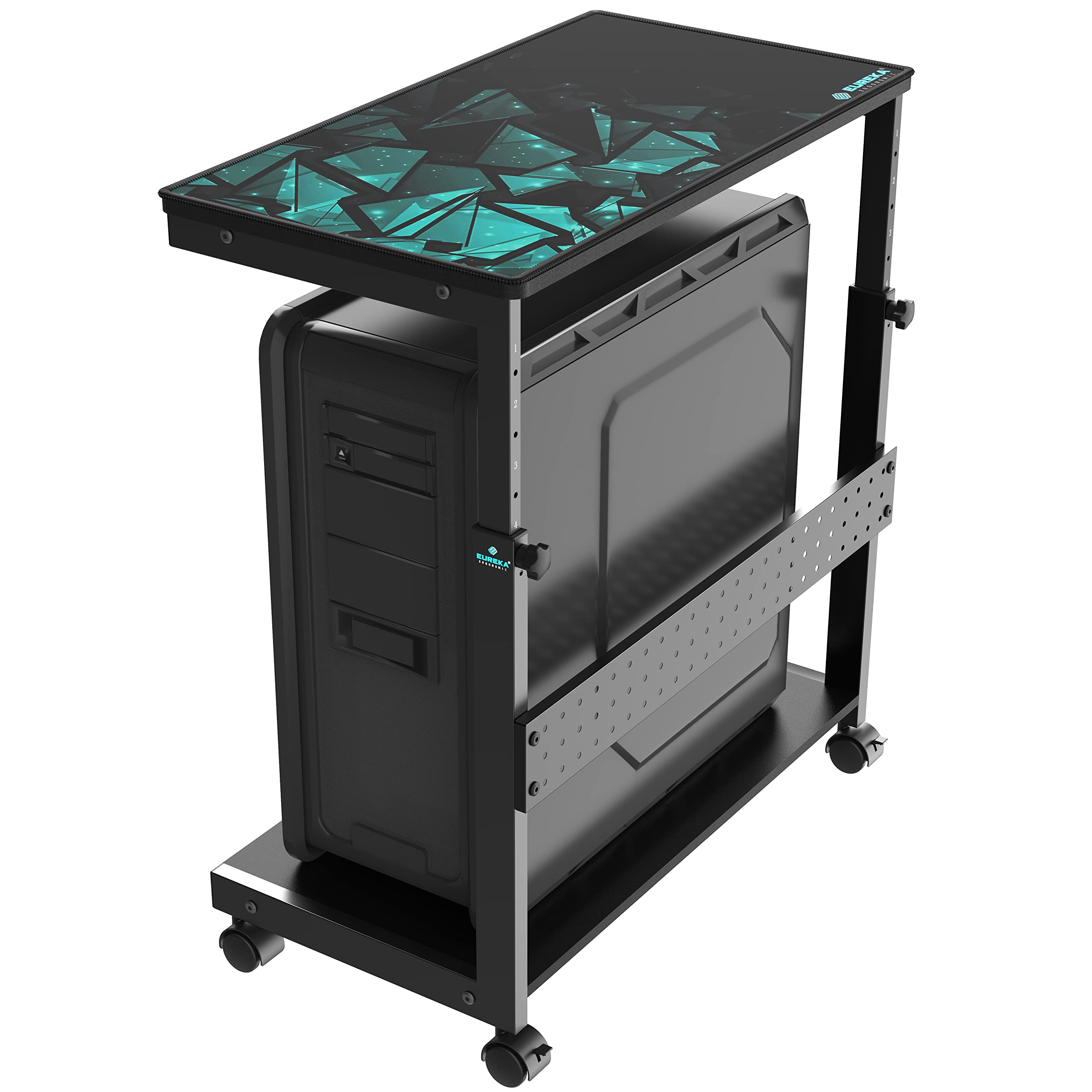
Its adjustable two-tier layout combines a lower tower shelf, an upper work surface and casters, making it worth considering when you want flexible placement and nearby storage.
EUREKA Tower Stand Review Summary
The quick verdict
2,000+ ratings
Read Amazon ReviewsEUREKA ERGONOMIC Height Adjustable Computer Tower Stand
A fit for desktop owners who want an adjustable, rolling tower stand with a second shelf for office gear and accessories.
- Six manual height settings span 23¼ to 33¼ inches, changing by two inches per position.
- Two-tier layout places the PC tower on the lower shelf and offers an upper surface for items such as a printer, plants, documents or magazines.
- The rear pegboard is intended for organizing office supplies such as power strips.
- Four 360-degree rotating casters are designed for movement on carpet; two have brakes.

Pros
- A broad adjustment range makes it easier to tailor tower height to the surrounding furniture.
- The upper shelf and pegboard add useful storage beyond the tower platform.
Consider before buying
- Height changes are manual and limited to six fixed positions rather than continuous adjustment.
- The moving capacity is lower than the stated stationary capacity for either shelf, so a loaded cart needs careful weight planning.
Read the full review summary
The stand’s central benefit is the way it combines tower storage with height adjustment and a second shelf.
Six manual settings span 23¼ to 33¼ inches, with two inches between positions, so you can choose a setup that better fits your desk or the space beside it.
The lower shelf is intended for a PC tower, including full-size ATX cases, while the upper shelf can hold items such as a printer, documents or magazines.
It is best suited to a home or office setup where a tower, small supplies and occasional movement share one compact footprint. Four rotating casters support repositioning, and two have brakes for keeping the cart in place.
Check your case’s dimensions, desk clearance and combined load before choosing a height or moving the stand; the available capacity differs between stationary use and movement.
The buying factors
EUREKA Tower Stand Scorecard
Editorial scores reflect listed features and buyer fit; they are not laboratory measurements or customer ratings.
Height flexibility
Six manual positions cover a 10-inch range, with two inches between settings.
Storage versatility
The two shelves and rear pegboard offer distinct places for a tower, work items and office supplies.
Tower compatibility
The design is described as supporting most cases, including full-size ATX, but buyers should still compare their case dimensions with the shelf.
Mobility
Four 360-degree casters are designed to roll, and two include brakes to hold the cart in position.
Load planning
Capacity is specified separately for each shelf and for moving the cart, so use requires attention to both placement and total load.
Setup flexibility
The stand can sit under a desk or beside a table, and its upper surface can serve several office uses.
Key Features and Specifications of EUREKA Tower Stand
- Six manual height settings span 23¼ to 33¼ inches, changing by two inches per position.
- Two-tier layout places the PC tower on the lower shelf and offers an upper surface for items such as a printer, plants, documents or magazines.
- The rear pegboard is intended for organizing office supplies such as power strips.
- Four 360-degree rotating casters are designed for movement on carpet; two have brakes.
- The lower shelf supports up to 100 pounds and the upper shelf up to 80 pounds when stationary. The cart supports up to 80 pounds while moving.
- The desktop panel has a scratch-resistant finish, and the frame is described as thickened steel with a powder-coated finish.
- An included mousepad allows the upper surface to be used for mouse operation or as an arm rest.
Pros and Cons of EUREKA Tower Stand
Pros
- A broad adjustment range makes it easier to tailor tower height to the surrounding furniture.
- The upper shelf and pegboard add useful storage beyond the tower platform.
- Casters make repositioning and floor cleaning easier, with brakes for stationary use.
- The lower shelf is described as suitable for most cases, including full-size ATX towers.
Consider before buying
- Height changes are manual and limited to six fixed positions rather than continuous adjustment.
- The moving capacity is lower than the stated stationary capacity for either shelf, so a loaded cart needs careful weight planning.
- Its two-tier format needs more room than a basic tower platform; measure the intended floor and desk space before buying.
Who Should Buy EUREKA Tower Stand?
Good fit
Consider this stand if you want your tower raised from the floor while keeping a printer or other office items close by.
The shelf spacing is adjustable, so you can choose a position that suits the space beneath or alongside a desk and the equipment you plan to place above the case.
It also makes sense if you expect to move your setup sometimes. The swiveling casters are intended to roll across carpet, while the two brakes let you secure the cart when it is parked.
Before loading it, add up the tower and upper-shelf items, and use the lower moving limit if you plan to reposition the cart while loaded.
The stand’s extra functions may be useful in a compact work area: the pegboard can organize small supplies, and the included mousepad makes the upper shelf usable for mouse work.
Those features are most valuable when you have a clear plan for how the upper surface will be used.
Who should skip it
Skip it if you need a tower holder that attaches directly to a desk and keeps the floor completely clear.
This design is a freestanding rolling cart with two shelves, so measure the footprint and check the route through doorways if you expect to move it between rooms.
It may also be a poor fit if you need continuously variable height, or if the combined load while moving could exceed 80 pounds.
Confirm your case size and the weight of everything you plan to carry before settling on this style.
How the EUREKA Tower Stand fits a practical PC setup
Set the height around your desk
The six positions range from 23¼ to 33¼ inches, making this stand useful when a tower needs to fit under a desk or sit beside a table.
Since each adjustment changes height by two inches, measure the clearance available at the position you intend to use and account for the tower’s own height.
Use the second tier deliberately
The upper shelf turns the cart into a small equipment station rather than a tower-only base.
A printer, documents or other listed items can occupy the top tier, while the rear pegboard provides a separate place for office supplies.
Think through how often you’ll access the upper shelf and whether its contents will stay there when the cart moves.
Plan around the load limits
The two shelves have separate stationary maximums, and the cart has a lower maximum while moving.
That distinction matters if you intend to roll the stand with a tower and accessories aboard: consider the total load and keep it within the moving limit. Brake the casters when the cart is in its working position.
Check case fit and floor space
The design is described as accommodating most PC cases, including full-size ATX models, but case format alone does not establish the fit of every tower.
Compare your case’s footprint with the stand’s shelf dimensions before purchase, and make sure there is room for the cart, desk and intended cable routing.
Alternatives to EUREKA Tower Stand
Office Carts & Stands alternative
1,000+ ratings
Read Amazon ReviewsVIVO Heavy Duty Under Desk Large PC Mount
Choose the EUREKA if you want a movable floor stand with a second shelf and room for a taller tower.
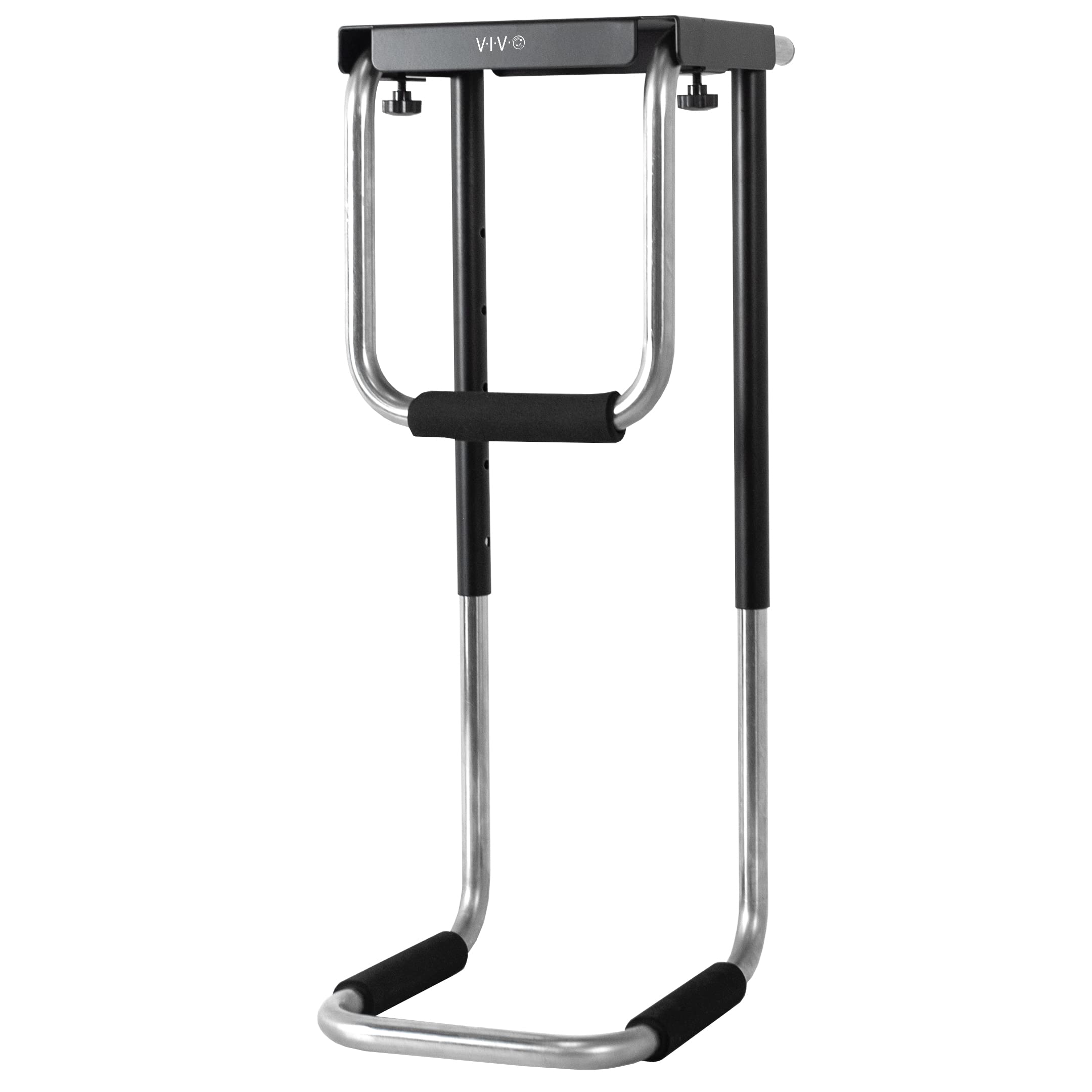
Consider the VIVO if clearing floor space with an under-desk mount better suits your setup and your case fits its listed dimensions and capacity.
- The VIVO mount attaches beneath a desk, adjusts to cases 5–10 inches wide and 13.75–21.5 inches high, and supports up to 66 pounds.
- The EUREKA stand is a freestanding cart with adjustable height, two shelves and rolling casters.
Office Carts & Stands alternative
400+ ratings
Read Amazon ReviewsVIVO Clamp-on Desk Leg Large PC Mount
The EUREKA suits buyers who want a freestanding cart and extra shelf space.
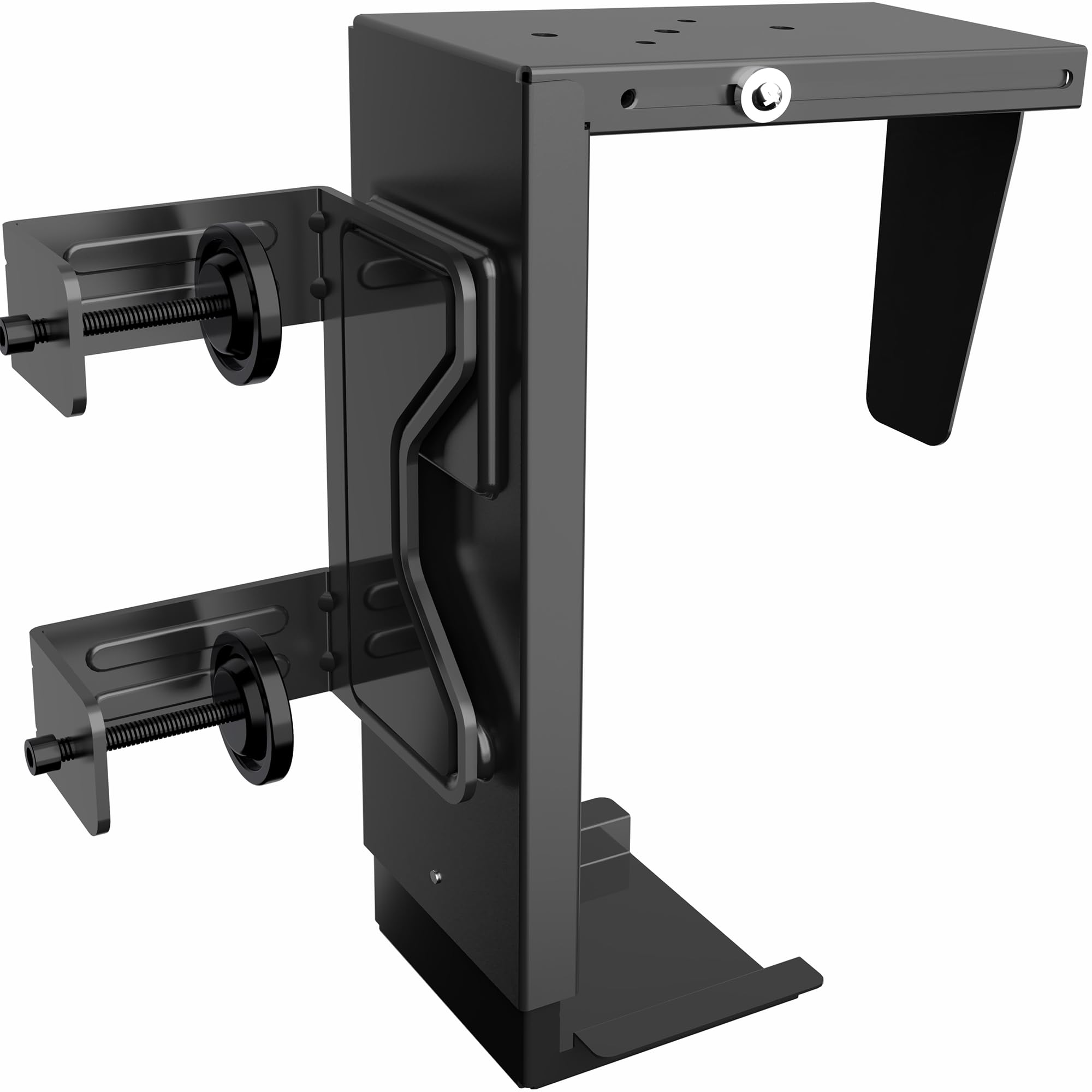
The VIVO is a more focused option when you want the tower attached to a desk leg, including a height-adjustable desk, and your case fits its stated size and weight limits.
- The VIVO clamps to a desk leg without drilling, fits cases 7.8–12.8 inches wide and 14.6–25.2 inches high, and supports towers up to 44 pounds.
- The EUREKA’s casters let the whole two-tier stand move across the floor, with brakes for stationary use.
Is EUREKA Tower Stand Worth It?
The EUREKA ERGONOMIC Height Adjustable Computer Tower Stand is worth considering if you want an adjustable, rolling base that also provides a second shelf and pegboard storage.
Its combination of tower support and nearby work-surface space makes it more useful than a basic platform for some home and office setups.
Buy after checking your case dimensions, available floor space and the combined load you expect to move.
The six fixed height settings and 80-pound moving limit are the main practical constraints; if those fit your needs, the added storage and mobility make this a flexible PC stand.
Your review at a glance
2,000+ ratings
Read Amazon ReviewsEUREKA ERGONOMIC Height Adjustable Computer Tower Stand
A fit for desktop owners who want an adjustable, rolling tower stand with a second shelf for office gear and accessories.
- Six manual height settings span 23¼ to 33¼ inches, changing by two inches per position.
- Two-tier layout places the PC tower on the lower shelf and offers an upper surface for items such as a printer, plants, documents or magazines.
- The rear pegboard is intended for organizing office supplies such as power strips.
- Four 360-degree rotating casters are designed for movement on carpet; two have brakes.