The SABRENT 4-Port USB 2.0 Data Hub review is for people who need a few more wired USB connections and want to control each port individually.
Its four switched ports keep the setup simple, though USB 2.0 speeds and no charging support make it best suited to peripherals and data connections.
SABRENT USB Hub Review Summary
The quick verdict
124,000+ ratings
Read Amazon ReviewsSABRENT 4-Port USB 2.0 Data Hub
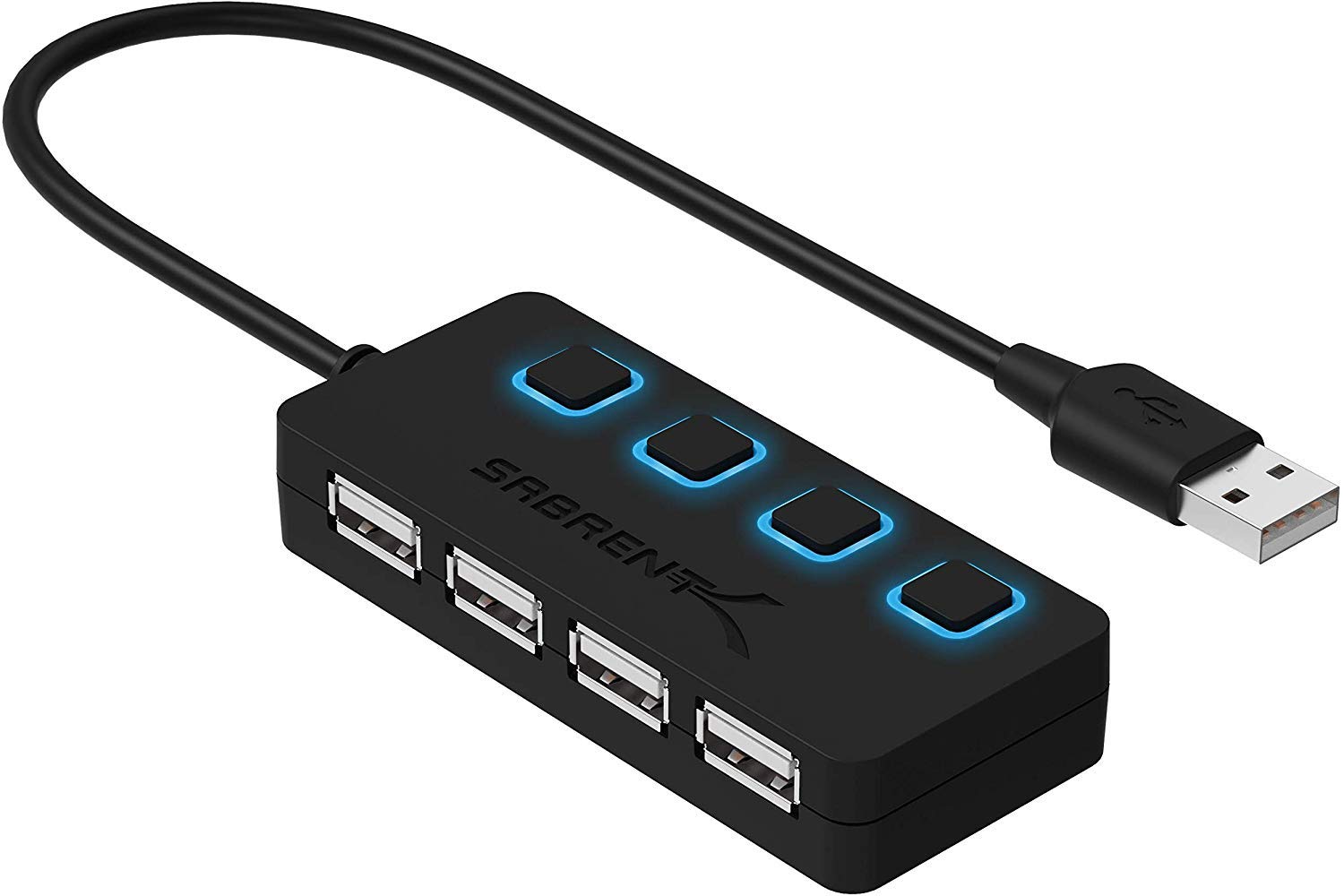
A simple way to add four USB 2.0 connections to a compatible computer, with individual switches for controlling connected devices.
- Expands one compatible USB connection into four USB 2.0 ports.
- Individual on/off switches let you connect or disconnect devices at each port.
- LED indicators show the power status of each port.
- Supports transfer speeds up to 480 Mbps with USB 2.0 and up to 12 Mbps with USB 1.1.

Pros
- Four ports provide a straightforward way to connect more USB peripherals.
- Individual switches make it easy to turn a port on or off without unplugging its device.
Consider before buying
- The hub does not support charging.
- USB 2.0’s maximum transfer rate is modest by current standards, so it is not the right choice when faster transfers are a priority.
Read the full review summary
This compact hub turns one compatible USB port into four USB 2.0 ports, with an LED indicator and on/off switch for each.
That individual control can be useful for desk setups where devices stay plugged in but do not need to remain connected all the time.
It is a practical fit for keyboards, mice, flash drives and other USB peripherals on compatible PCs and Macs.
The key limitation is its role as a data hub: charging is not supported, and its USB 2.0 transfer ceiling is lower than newer USB standards.
The buying factors
SABRENT USB Hub Scorecard
Editorial scores reflect listed features and buyer fit; they are not laboratory measurements or customer ratings.
Port expansion
Adds four USB 2.0 ports from one compatible connection.
Port control
Each port has its own on/off switch and power-status LED.
Setup simplicity
Plug-and-play operation does not require driver installation.
Device compatibility
Supports USB 1.1 devices and is described for use with compatible PCs and Macs.
Transfer capability
USB 2.0 supports speeds up to 480 Mbps, suitable for basic peripherals but limited against newer standards.
Charging usefulness
Charging is explicitly not supported, so it cannot serve as a charging hub.
Key Features and Specifications of SABRENT USB Hub
- Expands one compatible USB connection into four USB 2.0 ports.
- Individual on/off switches let you connect or disconnect devices at each port.
- LED indicators show the power status of each port.
- Supports transfer speeds up to 480 Mbps with USB 2.0 and up to 12 Mbps with USB 1.1.
- Reverse compatible with USB 1.1 devices.
- Plug-and-play setup requires no driver installation, and the hub is hot-swappable.
- Does not support charging.
Pros and Cons of SABRENT USB Hub
Pros
- Four ports provide a straightforward way to connect more USB peripherals.
- Individual switches make it easy to turn a port on or off without unplugging its device.
- Per-port LEDs make power status visible at a glance.
- No driver installation is required for setup.
Consider before buying
- The hub does not support charging.
- USB 2.0’s maximum transfer rate is modest by current standards, so it is not the right choice when faster transfers are a priority.
- It uses one existing USB port, so check that the computer or other host has a compatible connection available.
Who Should Buy SABRENT USB Hub?
Good fit
Consider it if your computer is short on ports for a keyboard, mouse, flash drive or other USB accessories.
The four-port layout can simplify a desk where several devices remain connected, while the individual switches provide a direct way to manage each connection.
The switches and LEDs are the distinguishing conveniences here.
If you often leave devices plugged in, being able to switch a port off without removing the cable may make the setup easier to manage; the indicator also helps you see each port’s power status.
Before choosing it, match the hub’s USB 2.0 speeds to your routine. It can be a sensible basic expansion option for ordinary peripherals, but the stated maximum is 480 Mbps, and charging is not supported.
Who should skip it
Skip it if you need a hub to charge phones, tablets or other devices; this model does not support charging.
Look for a newer, faster interface if your main goal is moving large files as quickly as possible, or verify that USB 2.0 meets the requirements of the devices you plan to connect.
How the SABRENT USB Hub fits a computer setup
Four ports from one connection
The hub is designed to solve a specific desk problem: too few USB ports on a compatible device.
Its four-port expansion can accommodate several wired accessories, but all of them share the single host connection, so it is best viewed as a convenience for adding peripherals rather than a replacement for a higher-speed connection.
Individual switches and status lights
A physical switch for each port lets you turn a device connection on or off while leaving its cable in place.
The LEDs show each port’s power status, which can make a cluster of connected accessories easier to manage, especially when you do not want every attached device active all the time.
USB 2.0 speed and device fit
USB 2.0 supports transfer speeds up to 480 Mbps, with USB 1.1 support up to 12 Mbps.
Those limits make the hub a better match for routine peripherals and occasional file transfers than for buyers seeking a fast path for large or frequent transfers; check the needs of your devices before relying on it for data-heavy work.
Simple setup, defined purpose
Plug-and-play operation and hot swapping reduce setup steps for compatible devices, and USB 1.1 reverse compatibility widens its peripheral fit.
Its purpose remains data and peripheral expansion, however: because charging is not supported, buyers needing power delivery should choose a hub with charging features that match their devices.
Alternatives to SABRENT USB Hub
No alternative model is recommended here. Compare the design and features that matter to your routine before choosing another option.
Is SABRENT USB Hub Worth It?
The SABRENT 4-Port USB 2.0 Data Hub is worth considering when you need four extra USB connections for basic peripherals and value separate port switches with visible status indicators.
Plug-and-play setup and USB 1.1 compatibility add flexibility for a straightforward computer desk.
Choose it only if USB 2.0 transfer speeds and data-only use fit your needs.
For charging or faster file transfers, seek a hub designed for those priorities; for everyday wired accessories, this model offers a simple, clearly controlled expansion point.
Your review at a glance
124,000+ ratings
Read Amazon ReviewsSABRENT 4-Port USB 2.0 Data Hub
A simple way to add four USB 2.0 connections to a compatible computer, with individual switches for controlling connected devices.
- Expands one compatible USB connection into four USB 2.0 ports.
- Individual on/off switches let you connect or disconnect devices at each port.
- LED indicators show the power status of each port.
- Supports transfer speeds up to 480 Mbps with USB 2.0 and up to 12 Mbps with USB 1.1.