The SABRENT 5-in-1 USB-C Hub review centers on a compact adapter for laptop users who want display output, four fast data ports, and pass-through charging from one USB-C connection.
Its single HDMI output and reliance on a separate charger make it a better fit for a focused desk or travel setup than a full docking station.
SABRENT USB-C Hub Review Summary
The quick verdict
188,000+ ratings
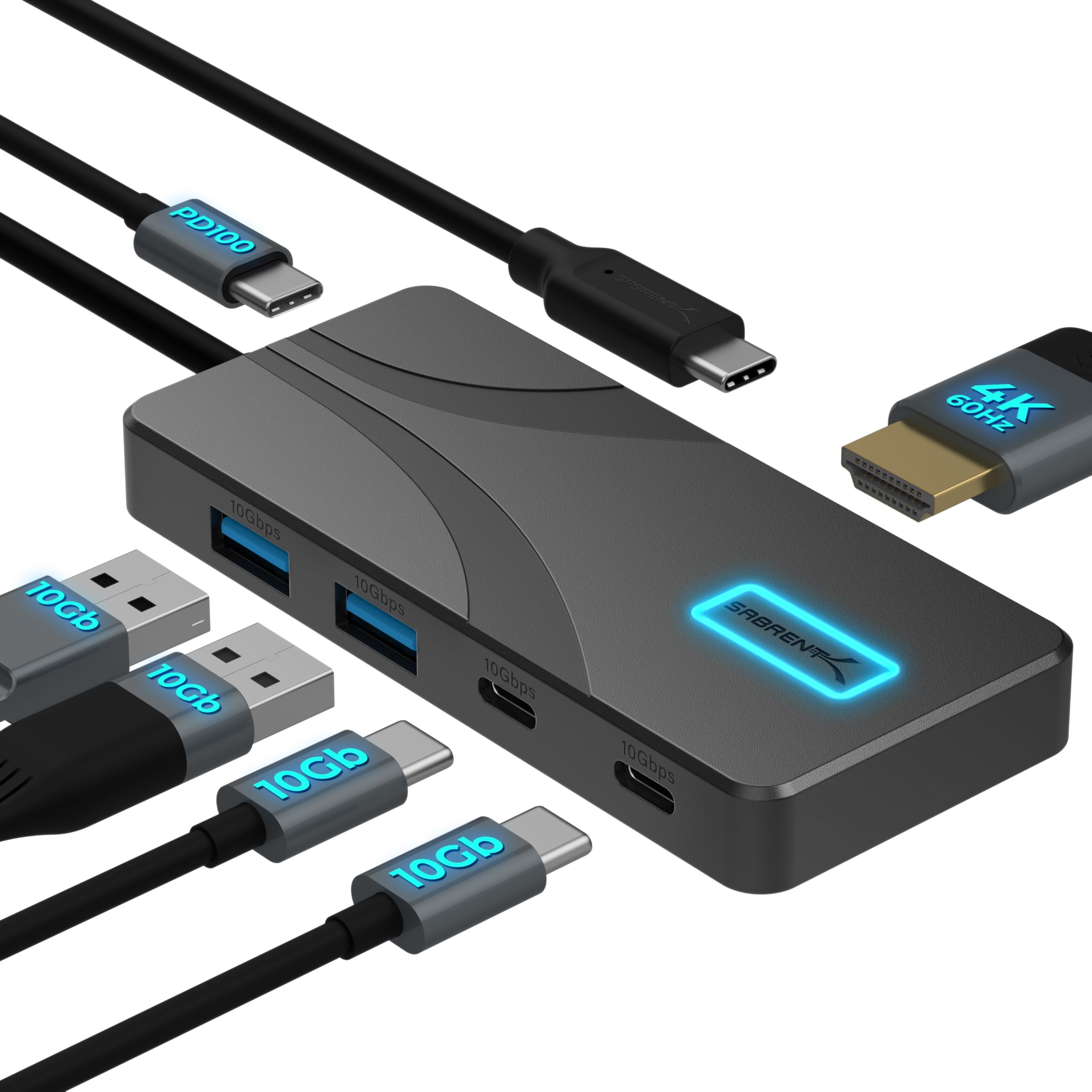
Read Amazon ReviewsSABRENT HB-TG5P 5-in-1 USB-C Hub
A compact fit for USB-C laptop users who want one 4K display, faster USB data ports, and pass-through charging in a travel-friendly hub.
- Two USB-A and two USB-C data ports support transfer speeds up to 10Gbps.
- One HDMI 2.0 port supports a single external display at up to 4096 × 2160 resolution and 60Hz, with HDR10, Dolby Vision, and HDCP 2.3.
- The dedicated USB-C PD input accepts up to 100W from a separate charger and passes up to 80W to the laptop.
- A backlit power switch provides control over the hub and connected devices; a blue glow indicates that it is on.

Pros
- Fast data connections are available on both USB-A and USB-C ports.
- Combines a single 4K 60Hz HDMI output with laptop charging pass-through.
Consider before buying
- A USB-C charger is not included, so pass-through charging depends on having a suitable charger already.
- Only one display can be connected through HDMI.
Read the full review summary
The HB-TG5P combines one HDMI 2.0 output for a single display, two USB-A data ports, two USB-C data ports, and a dedicated USB-C power input.
Its four data ports support up to 10Gbps, while the PD input accepts up to 100W from a charger you provide and passes up to 80W to the laptop.
That mix gives a modern laptop room for a monitor, storage, and everyday peripherals without a large dock.
The aluminum enclosure, 24-inch integrated cable, backlit power switch, and plug-and-play support across Windows, macOS, ChromeOS, and Linux make it convenient for a portable workstation.
Buyers should check that their computer supports DisplayPort Alternate Mode over USB-C for HDMI output, and confirm its charging needs work with the hub's pass-through limit.
It offers one display connection and no Ethernet, card reader, or audio jack.
The buying factors
SABRENT USB-C Hub Scorecard
Editorial scores reflect listed features and buyer fit; they are not laboratory measurements or customer ratings.
Port selection
Four 10Gbps data ports and a dedicated power input cover common laptop accessories and storage.
Display support
The HDMI 2.0 port supports one display at up to 4K and 60Hz, with host compatibility requirements to check.
Pass-through charging
The hub accepts up to 100W input and passes up to 80W to a laptop, using a separately supplied charger.
Portability
Its slim aluminum body and integrated 24-inch cable are suited to desk use and packing in a bag.
Device control
A backlit switch offers a simple way to turn the hub and connected devices on or off.
Expansion breadth
It provides useful USB and display expansion but has no Ethernet, memory card slots, or audio jack.
Key Features and Specifications of SABRENT USB-C Hub
- Two USB-A and two USB-C data ports support transfer speeds up to 10Gbps.
- One HDMI 2.0 port supports a single external display at up to 4096 × 2160 resolution and 60Hz, with HDR10, Dolby Vision, and HDCP 2.3.
- The dedicated USB-C PD input accepts up to 100W from a separate charger and passes up to 80W to the laptop.
- A backlit power switch provides control over the hub and connected devices; a blue glow indicates that it is on.
- The aluminum housing is designed for passive heat spreading, with no fan, and the integrated USB-C cable measures 60cm (24 inches).
- Plug-and-play compatibility is listed for Windows, macOS, ChromeOS, and Linux, with no driver installation required.
Pros and Cons of SABRENT USB-C Hub
Pros
- Fast data connections are available on both USB-A and USB-C ports.
- Combines a single 4K 60Hz HDMI output with laptop charging pass-through.
- The integrated cable and compact aluminum body suit portable setups.
- The power switch makes it easy to cut power to connected devices when finished.
Consider before buying
- A USB-C charger is not included, so pass-through charging depends on having a suitable charger already.
- Only one display can be connected through HDMI.
- The hub has no Ethernet, SD or microSD reader, or audio jack.
- HDMI output depends on the host USB-C port supporting DisplayPort Alternate Mode; verify this for the specific computer.
Who Should Buy SABRENT USB-C Hub?
Good fit
Consider this hub if your laptop has fewer ports than your desk routine requires and you want a compact way to attach a monitor, fast external storage, and accessories.
Having both USB-A and USB-C data ports helps accommodate a mix of newer and older peripherals without making the hub itself bulky.
It is also a practical match for a travel setup where one external display is enough.
Bring a compatible USB-C charger if you want laptop charging through the hub, and check that its available output suits your computer; the hub passes up to 80W to the host.
Before buying, verify DisplayPort Alternate Mode support on the USB-C port you plan to use. The HDMI connection relies on that capability, and extended desktop mode also requires MST support on the device.
Who should skip it
Look elsewhere if your setup needs two external displays from this hub, wired Ethernet, a card reader, or a dedicated audio jack. Those connections are outside this model's listed port selection.
It is also a poor match if you expect an included charger or need more charging power than the hub can pass to the laptop. Check your laptop's charging requirements and your existing adapter before choosing.
How the SABRENT USB-C Hub fits a compact workstation
Fast ports for mixed peripherals
With two USB-A and two USB-C data ports, the hub can accommodate a blend of accessories without reserving one connector type for storage.
All four data ports are specified for up to 10Gbps, which is useful when compatible devices and cables support those rates. Actual transfer speeds depend on the connected equipment and workload.
One monitor, with a host-side check
The HDMI 2.0 output supports one monitor or TV at up to 4K resolution and 60Hz. That is a useful desktop extension for a compatible laptop, but the video signal requires DisplayPort Alternate Mode over USB-C.
Buyers should check their computer model and USB-C port, especially when a device has more than one USB-C connection with different capabilities.
Charging pass-through requires your adapter
A dedicated PD input keeps the power connection separate from the hub's four data ports.
It accepts up to 100W from a USB-C charger and passes up to 80W onward to the laptop, so the charger is an essential part of the setup rather than an included accessory.
Consider the laptop's normal power needs and leave room for the hub's pass-through limit.
Portable construction and simple control
The 60cm integrated cable gives some flexibility in positioning the hub beside a laptop, and the aluminum housing is intended to spread heat passively without fan noise.
The backlit switch is a useful touch for turning attached devices off together. Allow up to 10 seconds for a newly connected device to be recognized, particularly when setting up peripherals at a busy workstation.
Alternatives to SABRENT USB-C Hub
USB Hubs alternative
188,000+ ratings
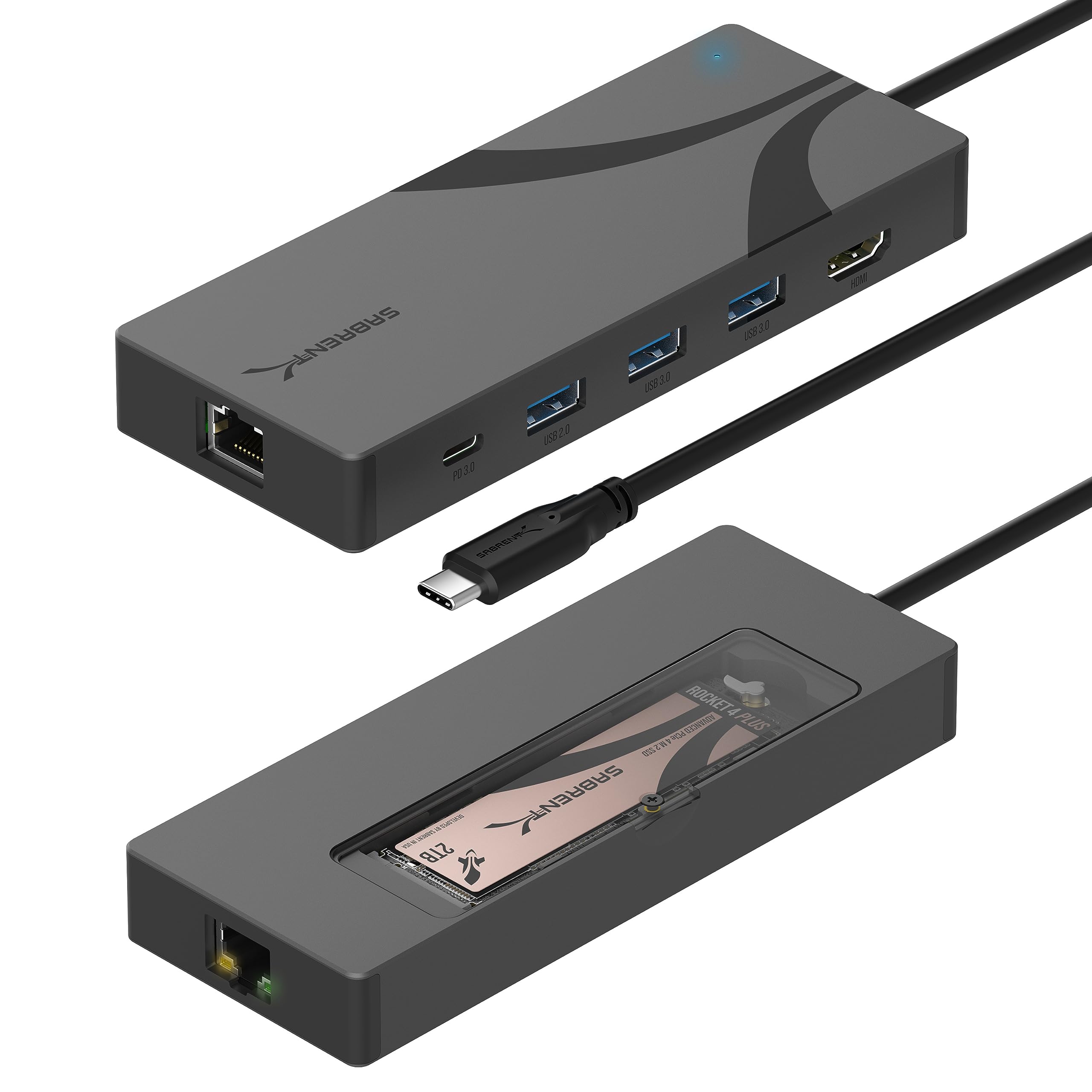
Read Amazon ReviewsSABRENT HB-6PNV USB-C Hub and M.2 SSD Dock
Choose the HB-TG5P for four 10Gbps USB data ports in a slim hub. Consider the HB-6PNV if built-in storage expansion and wired Ethernet matter more than faster data ports across all four connections.
- The HB-6PNV adds an M.2 NVMe or SATA drive enclosure, Gigabit Ethernet, and one 4K 60Hz HDMI output.
- Its internal drive slot runs at up to 5Gbps, and it passes up to 90W to the host from a separately supplied charger.
- The HB-TG5P focuses on four 10Gbps data ports, one HDMI display, and up to 80W laptop charging pass-through.
USB Hubs alternative
188,000+ ratings
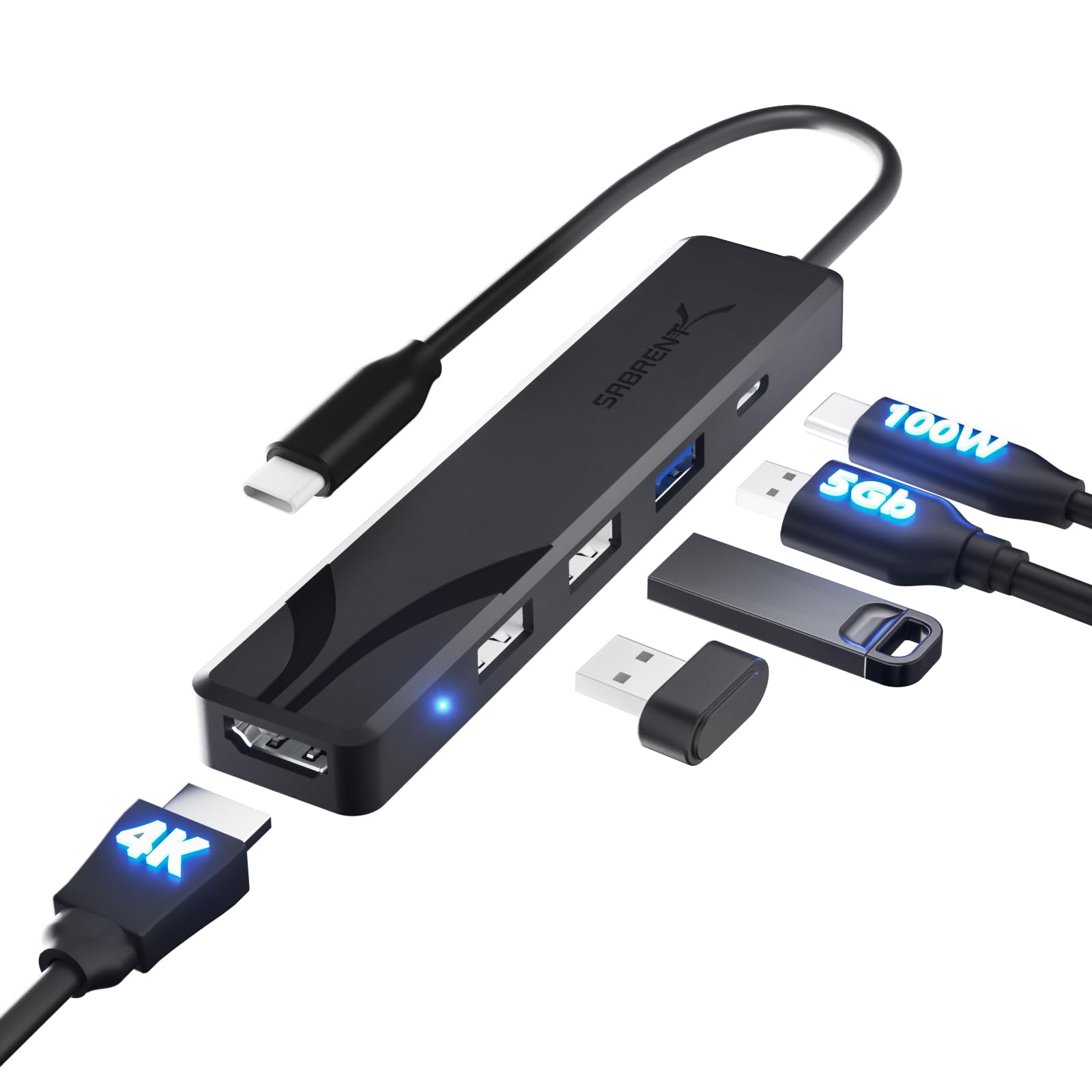
Read Amazon ReviewsSABRENT HB-TC5P USB-C Hub
The HB-TG5P is the stronger fit when several fast USB data connections, including USB-C, are useful. The HB-TC5P may suit a simpler setup built around USB-A accessories and a display, where its slower data ports are adequate.
- The HB-TC5P provides one 5Gbps USB-A port, two 480Mbps USB-A ports, one HDMI output supporting up to 4K at 60Hz, and up to 100W charging pass-through from a separately supplied charger.
- The HB-TG5P offers two USB-A and two USB-C data ports, each supporting up to 10Gbps, alongside one HDMI output.
Is SABRENT USB-C Hub Worth It?
The SABRENT HB-TG5P 5-in-1 USB-C Hub is worth considering for a laptop user who needs a single external display, several fast USB data connections, and charging pass-through in a compact enclosure.
Its blend of two USB-A and two USB-C data ports gives it a useful role as a portable everyday adapter.
Make the purchase decision around compatibility and connectivity: confirm DisplayPort Alternate Mode support, check the 80W charging pass-through against your laptop's needs, and make sure one display is enough.
If those conditions fit, the HB-TG5P brings useful expansion without the footprint of a larger dock.
Your review at a glance
188,000+ ratings
Read Amazon ReviewsSABRENT HB-TG5P 5-in-1 USB-C Hub
A compact fit for USB-C laptop users who want one 4K display, faster USB data ports, and pass-through charging in a travel-friendly hub.
- Two USB-A and two USB-C data ports support transfer speeds up to 10Gbps.
- One HDMI 2.0 port supports a single external display at up to 4096 × 2160 resolution and 60Hz, with HDR10, Dolby Vision, and HDCP 2.3.
- The dedicated USB-C PD input accepts up to 100W from a separate charger and passes up to 80W to the laptop.
- A backlit power switch provides control over the hub and connected devices; a blue glow indicates that it is on.