This Silkland USB C to DisplayPort 1.4 Cable review looks at a two-pack aimed at people who need a direct USB-C or Thunderbolt connection to a DisplayPort monitor.
Its headline appeal is broad high-resolution support, with an important catch: the source device must send video over USB-C, and the cable works in one direction.
Silkland DisplayPort Cable Review Summary
The quick verdict
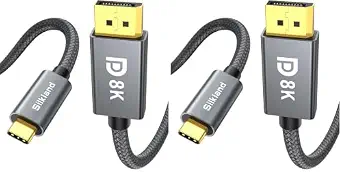
Silkland USB-C to DisplayPort 1.4 Cable
A two-cable set for USB-C and Thunderbolt users connecting compatible computers, tablets, or phones to DisplayPort monitors.
- Two 6.6-foot USB-C to DisplayPort 1.4 cables are included in the pack.
- Supports listed video modes up to 8K at 60Hz, 5K at 60Hz, 5120 × 1440 at 120Hz, 4K at up to 240Hz, and 2K at up to 240Hz.
- Uses DisplayPort 1.4 with HBR3 bandwidth listed at up to 32.4Gbps, plus DSC, FEC, Dynamic HDR, and HDCP 2.2/1.4 support.
- Supports Multi-Stream Transport for daisy chaining up to four 1080p monitors when the devices and display setup support it.

Pros
- The two-pack offers a spare or a second cable for another compatible display setup.
- The supported resolution and refresh-rate combinations cover both high-resolution screens and high-refresh gaming or work monitors.
Consider before buying
- The connection is directional, so it cannot be used to send DisplayPort output from a computer to a USB-C display.
- USB-C shape alone does not guarantee video output; the host port and system must support it.
Read the full review summary
The S1405 is a straightforward way to connect a compatible USB-C or Thunderbolt 3/4 host to a DisplayPort screen without adding a driver or adapter.
The two-pack can suit a desk with more than one display setup or provide a spare, while the listed resolutions and refresh rates cover a wide range of monitor use cases.
Its strongest fit is a buyer who has already confirmed video output on the source port and DisplayPort input on the monitor.
The cable does not convert HDMI, USB-A, DVI, or VGA, and it is not bidirectional; checking both ends before ordering matters more than the long compatibility list.
The buying factors
Silkland DisplayPort Cable Scorecard
Editorial scores reflect listed features and buyer fit; they are not laboratory measurements or customer ratings.
Display format range
The listed modes extend through 8K at 60Hz, 5K at 60Hz, and 4K at up to 240Hz, subject to the connected equipment and setup.
Refresh-rate flexibility
Several high-refresh options are listed, including 4K at 144Hz or 240Hz and 2K at up to 240Hz.
Connection clarity
The one-way USB-C-host-to-DisplayPort-display path is clearly defined, though buyers must verify that the host USB-C port supports video output.
Multi-display potential
MST support is listed for daisy chaining up to four 1080p monitors, with results dependent on compatible equipment.
Cable construction
The design includes a nylon braided jacket, aluminum shell, copper wire, and gold-plated connectors.
Pack value and support
Two cables are included, and the product information specifies 24-month customer care.
Key Features and Specifications of Silkland DisplayPort Cable
- Two 6.6-foot USB-C to DisplayPort 1.4 cables are included in the pack.
- Supports listed video modes up to 8K at 60Hz, 5K at 60Hz, 5120 × 1440 at 120Hz, 4K at up to 240Hz, and 2K at up to 240Hz.
- Uses DisplayPort 1.4 with HBR3 bandwidth listed at up to 32.4Gbps, plus DSC, FEC, Dynamic HDR, and HDCP 2.2/1.4 support.
- Supports Multi-Stream Transport for daisy chaining up to four 1080p monitors when the devices and display setup support it.
- Designed for a one-way connection from a video-capable USB-C or Thunderbolt 3/4 host to a DisplayPort display; no driver is required.
- Construction details include 28 AWG copper wire, gold-plated interfaces, a tinplate shield, an aluminum shell, and a nylon braided jacket.
Pros and Cons of Silkland DisplayPort Cable
Pros
- The two-pack offers a spare or a second cable for another compatible display setup.
- The supported resolution and refresh-rate combinations cover both high-resolution screens and high-refresh gaming or work monitors.
- MST support adds a multi-monitor option for compatible systems and displays.
- Braided cable covering and an aluminum shell are useful construction choices for a cable that may be moved or routed regularly.
Consider before buying
- The connection is directional, so it cannot be used to send DisplayPort output from a computer to a USB-C display.
- USB-C shape alone does not guarantee video output; the host port and system must support it.
- It cannot serve as an HDMI, VGA, DVI, or USB-A adapter, which limits its usefulness in mixed-port setups.
Who Should Buy Silkland DisplayPort Cable?
Good fit
Consider the Silkland DisplayPort Cable if your computer, tablet, or phone has a USB-C or Thunderbolt 3/4 port with video output and your monitor accepts DisplayPort.
Confirm the exact port capabilities in your device specifications, then match the monitor's resolution and refresh rate to the modes supported by the rest of your setup.
The pair may be especially practical for someone wiring two compatible stations or keeping a spare available.
If you use MST, check that the host, monitor chain, and display settings support the intended arrangement; the four-monitor figure applies to 1080p displays.
Who should skip it
Skip this cable if either end requires HDMI, VGA, DVI, or USB-A, or if you need a DisplayPort-to-USB-C direction. Choose a connection type that matches the actual source and display ports.
It may also be a poor fit if you cannot confirm video output from the USB-C host port. The connector's shape by itself does not establish that capability.
How the Silkland DisplayPort Cable Fits a Monitor Setup
Check the signal direction and host port
This cable sends video from a USB-C host to a DisplayPort monitor.
That makes the source port the first compatibility check: look for video output support on the specific USB-C or Thunderbolt port, then confirm that the screen has a DisplayPort input.
A compatible connector on both ends is necessary, but the listed USB-C devices are examples rather than a substitute for checking the exact model and port.
Match resolution and refresh rate
The range includes 8K at 60Hz, 5K at 60Hz, ultrawide 5120 × 1440 at 120Hz, and 4K modes reaching up to 240Hz.
These are supported modes, not a guarantee that every computer and monitor combination will reach each one.
The graphics hardware, monitor, and other parts of the connection all need to support the selected resolution and refresh rate, so compare the target display mode against the complete setup before buying.
Consider MST for multiple displays
Multi-Stream Transport support is listed for daisy chaining as many as four 1080p monitors.
That can be useful where a compatible host and display chain support MST, but the cable alone does not establish that every system can run four screens.
Confirm MST support on the computer and monitors and check their connection arrangement if extending beyond a single display.
Build and pack details
The 6.6-foot cables have a nylon braid, aluminum shell, copper conductors, and gold-plated interfaces; the described design also includes a tinplate shield.
The two-cable pack can help when a second connection is needed, though its length should be compared with the distance and routing between the host and screen. The product information also specifies 24-month customer care.
Alternatives to Silkland DisplayPort Cable
No alternative model is recommended here. Compare the connection direction, supported display modes, and ports in your setup before choosing another cable.
Is Silkland DisplayPort Cable Worth It?
The Silkland USB-C to DisplayPort 1.4 Cable is worth considering when you need two direct, one-way connections from video-capable USB-C or Thunderbolt hosts to DisplayPort monitors.
Its high listed display modes, MST support, and braided construction make it a flexible option for compatible setups.
Before choosing it, verify video output on the host port, DisplayPort on the monitor, and support for your target resolution and refresh rate across the whole system.
If your setup depends on another connector type or the opposite signal direction, this cable will not meet that need.
Your review at a glance
Silkland USB-C to DisplayPort 1.4 Cable
A two-cable set for USB-C and Thunderbolt users connecting compatible computers, tablets, or phones to DisplayPort monitors.
- Two 6.6-foot USB-C to DisplayPort 1.4 cables are included in the pack.
- Supports listed video modes up to 8K at 60Hz, 5K at 60Hz, 5120 × 1440 at 120Hz, 4K at up to 240Hz, and 2K at up to 240Hz.
- Uses DisplayPort 1.4 with HBR3 bandwidth listed at up to 32.4Gbps, plus DSC, FEC, Dynamic HDR, and HDCP 2.2/1.4 support.
- Supports Multi-Stream Transport for daisy chaining up to four 1080p monitors when the devices and display setup support it.