The best keyboards for work balance a comfortable typing feel with the layout and connection options your desk actually needs. Choose among quiet full-size boards, compact layouts and mechanical models with extra controls, while checking noise, numeric-keypad needs and software compatibility.
Quick Top Products
JLab Epic Wireless Keyboard
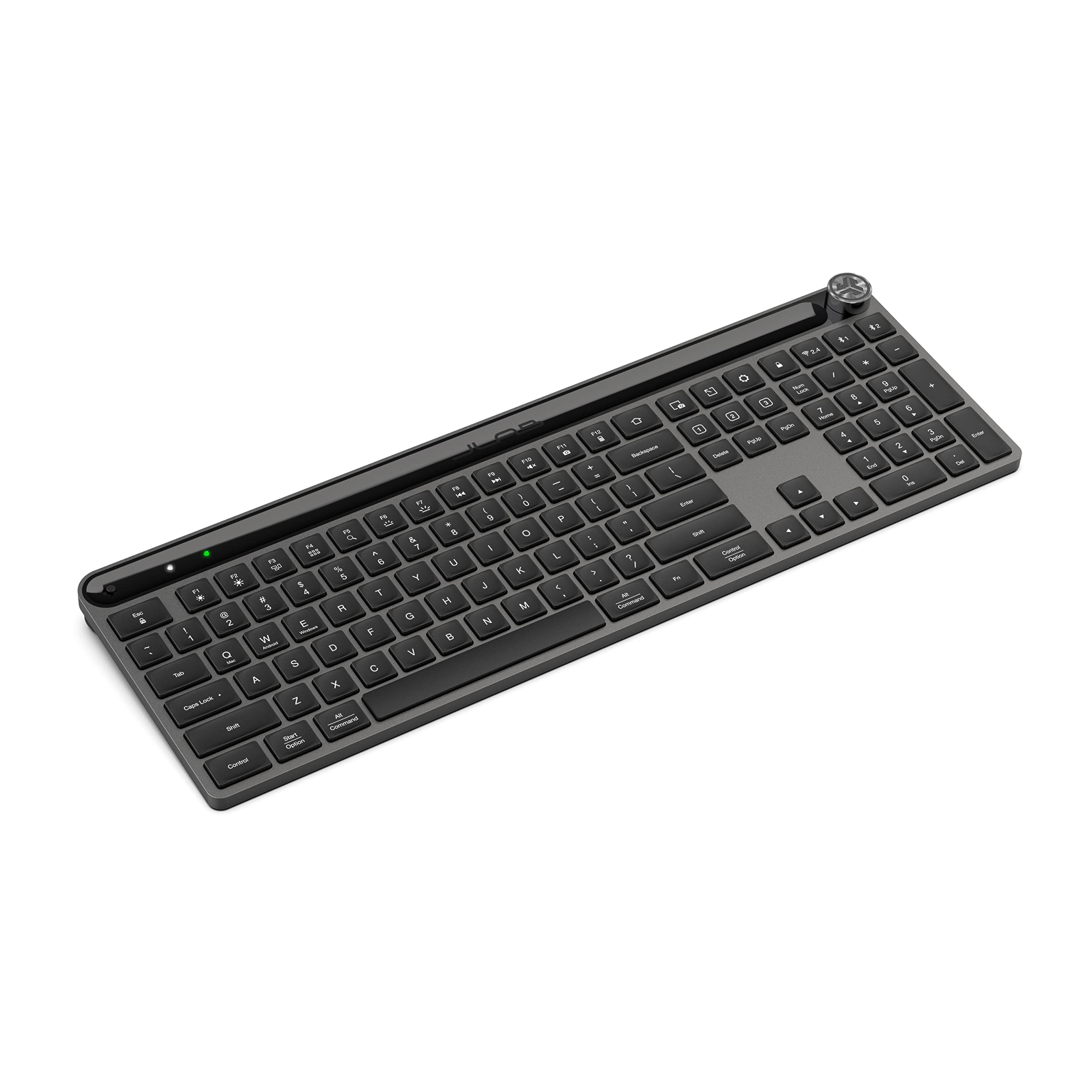
- 108 full-size backlit keys include a numeric keypad.
- Bluetooth connects to up to three devices; a USB dongle is also included as an option.
- Soft-touch keys, a metal base and a built-in media knob suit desk work.
Best For: People who want a quiet full-size keyboard with backlighting and easy device switching.

JLab JBuds Wireless Keyboard
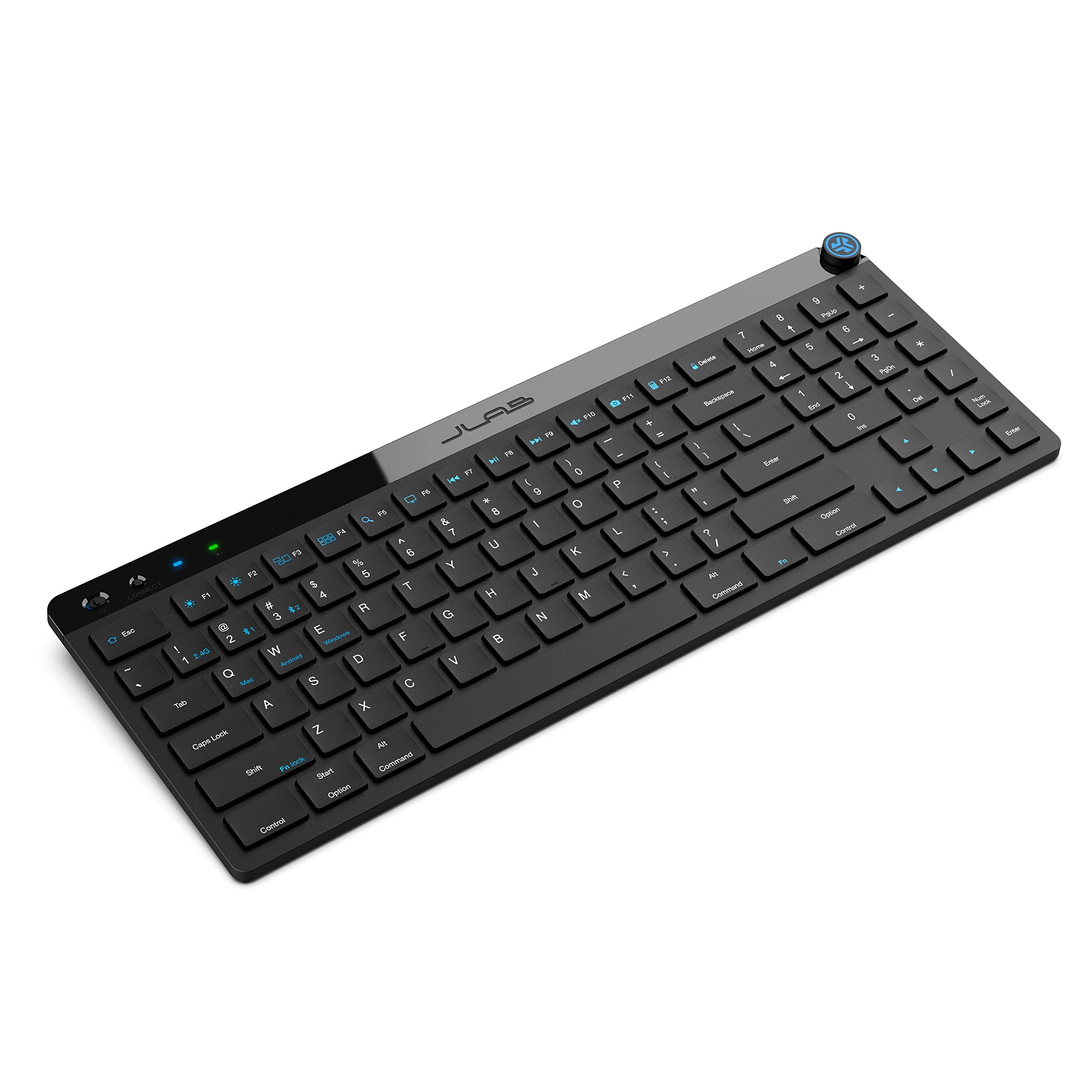
- 95 soft-touch keys include a full numerical pad.
- Switch among two Bluetooth connections and a USB wireless dongle.
- Battery life is rated up to 30 days of wireless use.
Best For: Desk workers who want a compact, quiet layout with a number pad and multiple device connections.
SteelSeries Apex 3
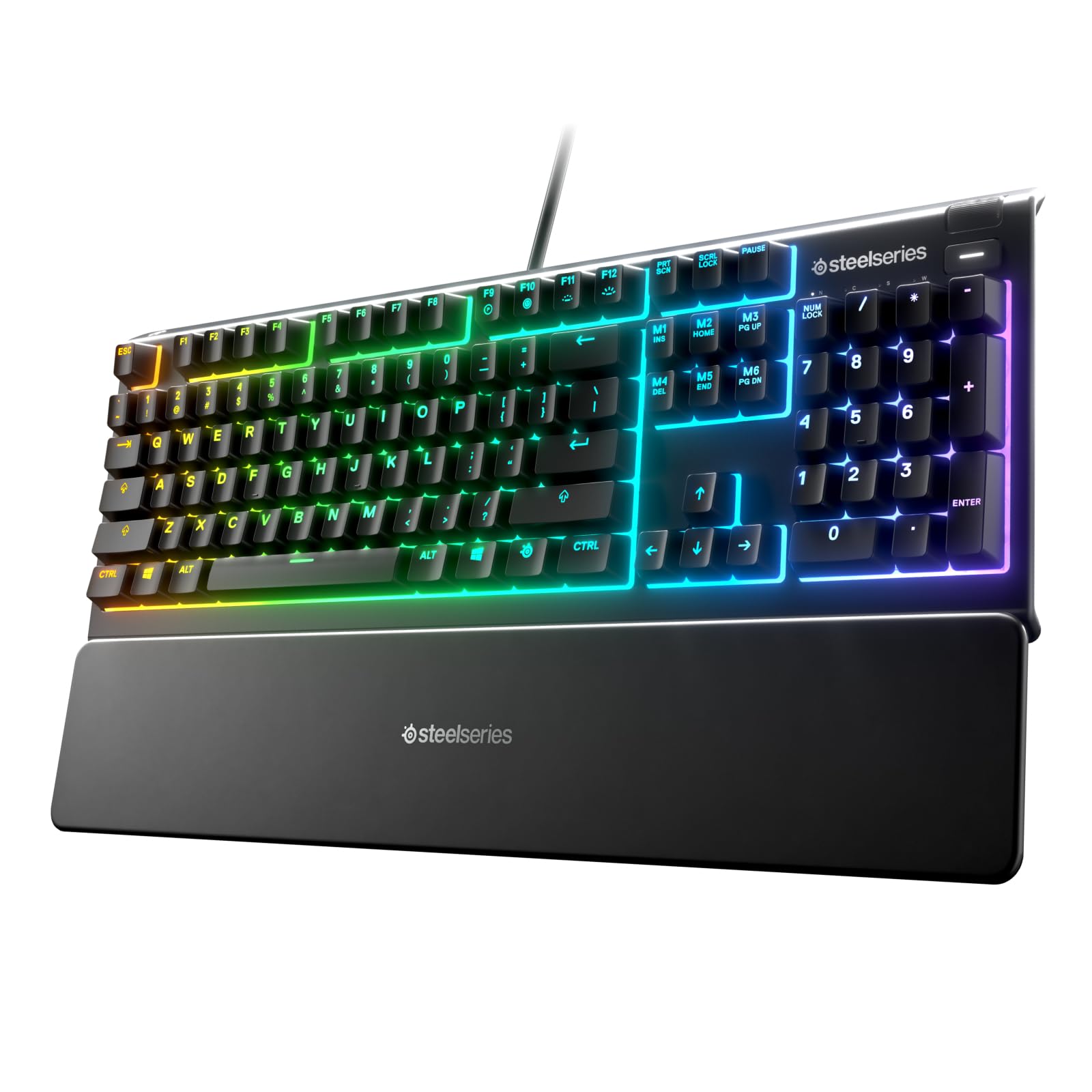
- Whisper-quiet switches are rated for 20 million keypresses.
- Magnetic wrist rest provides palm support.
- IP32 water resistance and dedicated multimedia controls.
Best For: People who want a quiet wired keyboard with a wrist rest and spill resistance for a busy desk.
SteelSeries Apex 3 TKL
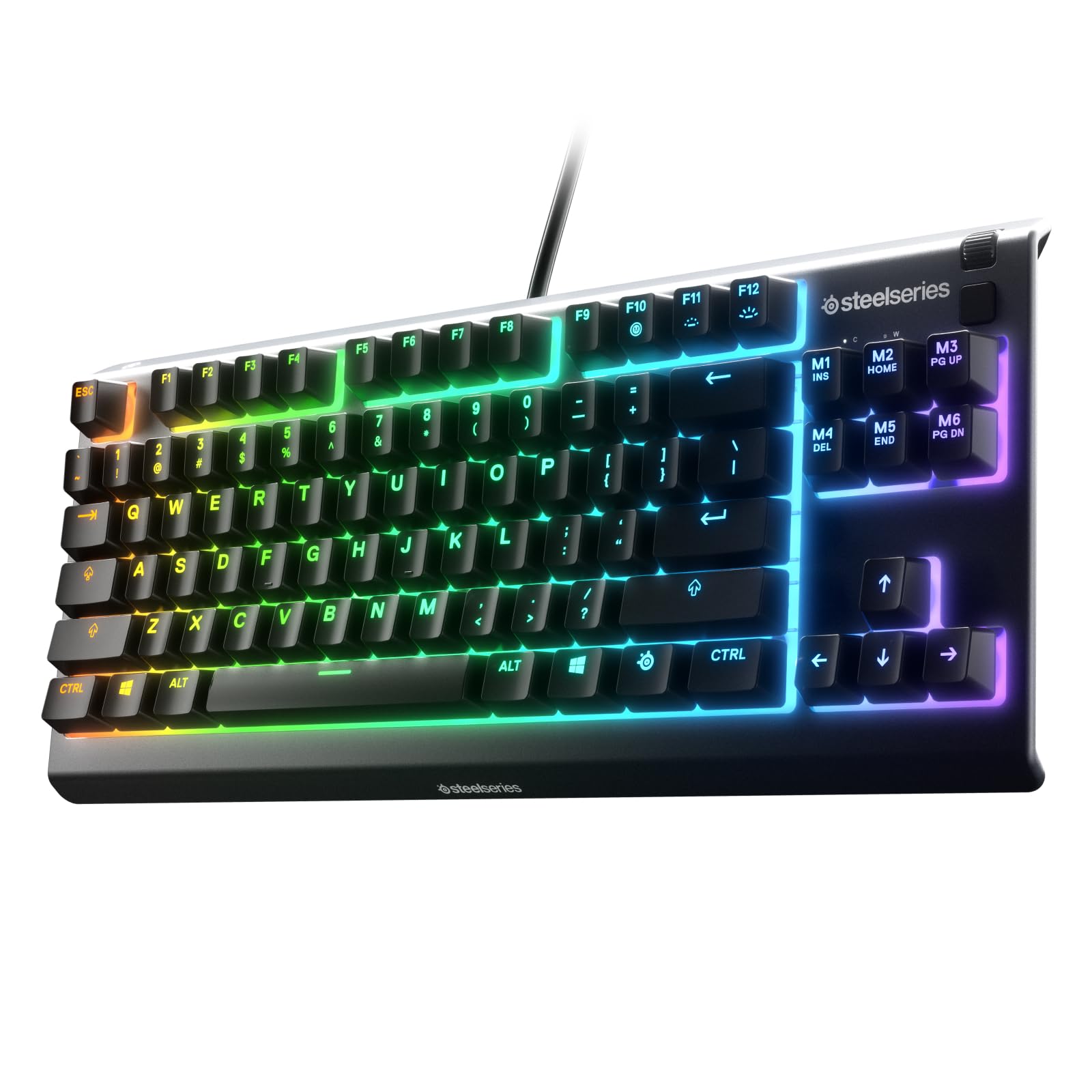
- Tenkeyless layout saves desk space.
- Whisper-quiet switches, anti-ghosting and IP32 water and dust resistance.
- Clickable volume roller, media keys and eight-zone RGB lighting.
Best For: Workers who want a quieter, smaller keyboard with spill and dust resistance.
SteelSeries Apex 5
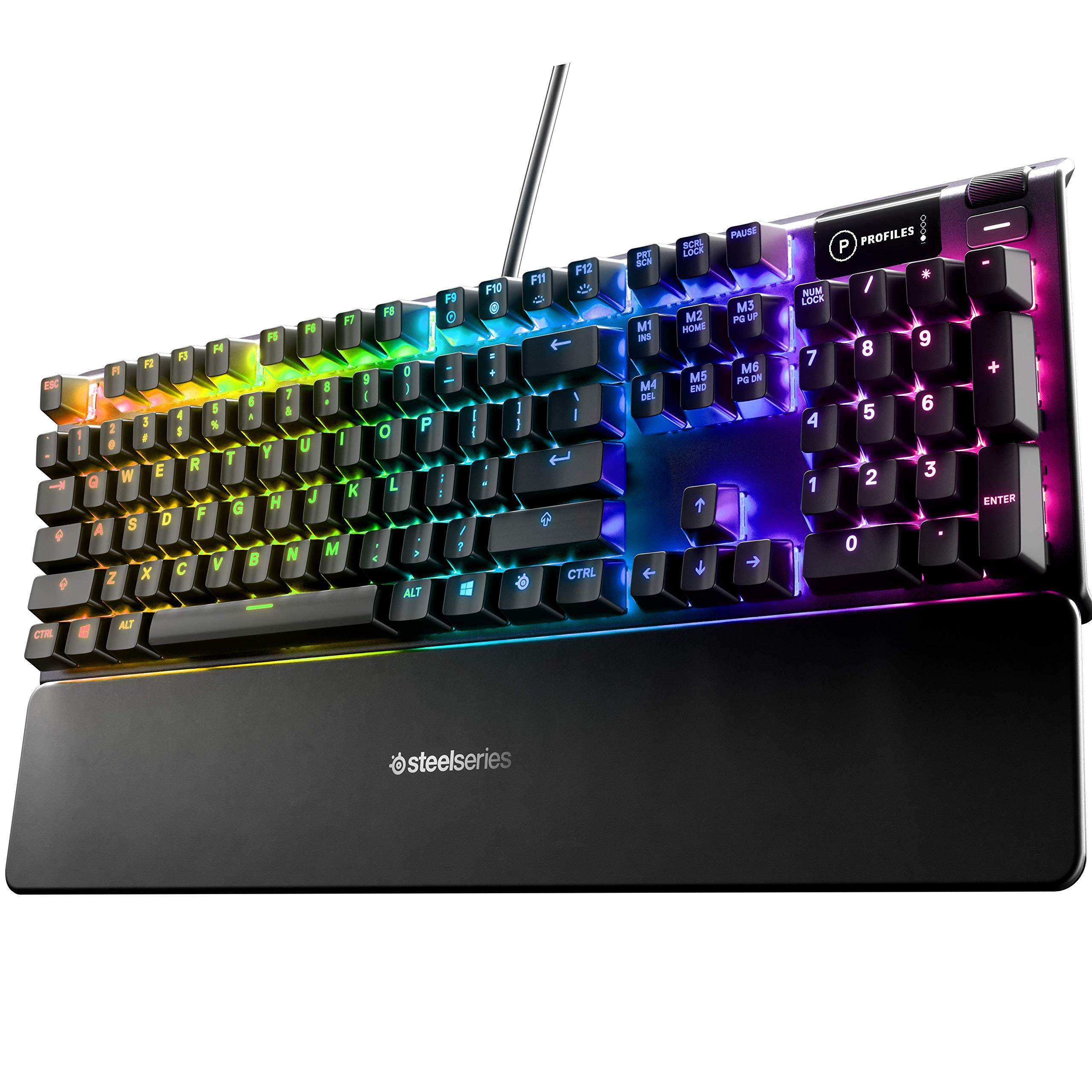
- Hybrid blue switches provide tactile, clicky feedback.
- OLED smart display supports customizable content.
- Per-key RGB lighting and magnetic wrist rest.
Best For: Workers who like a tactile, clicky keyboard and want per-key lighting and a display.
SteelSeries Apex 7 TKL
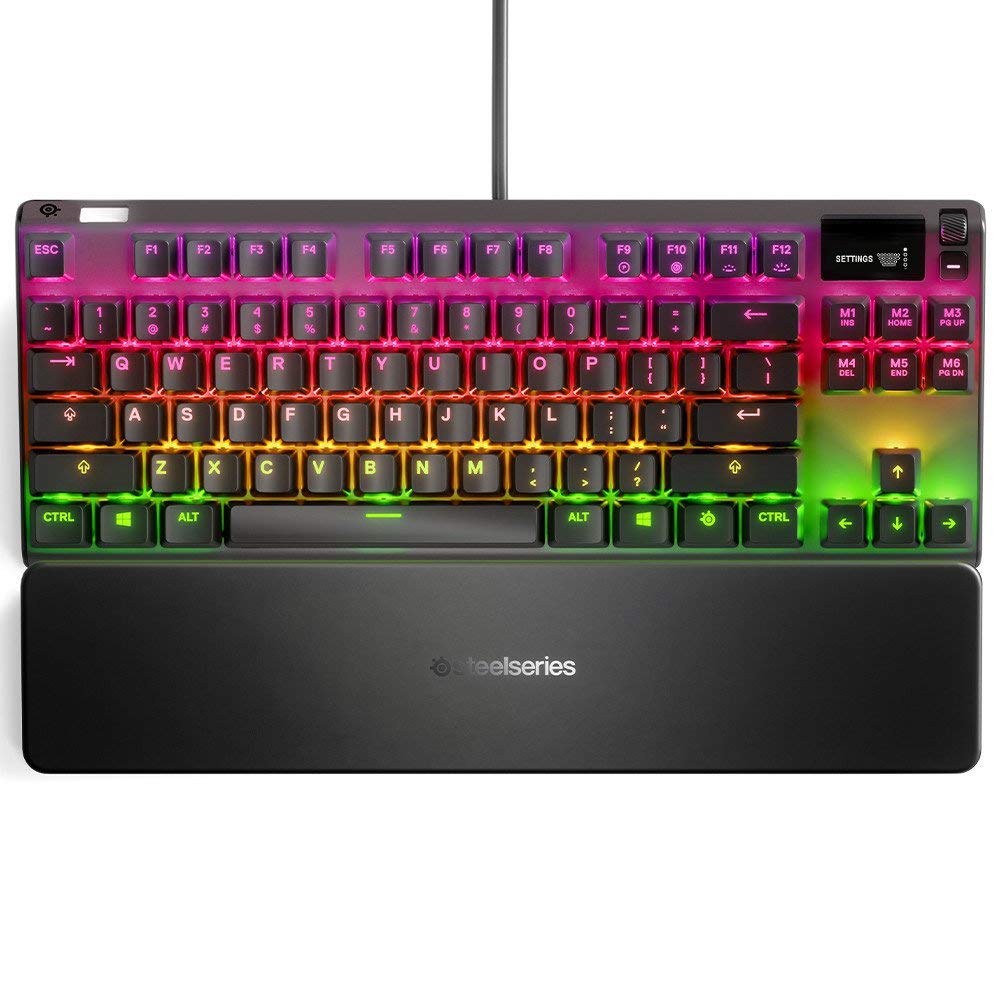
- Tenkeyless layout with linear, quiet red switches.
- OLED display, media controls and USB passthrough.
- Per-key RGB and magnetic wrist rest.
Best For: Workers who want a tenkeyless mechanical keyboard with quiet linear switches and a wrist rest.
SteelSeries Apex 7
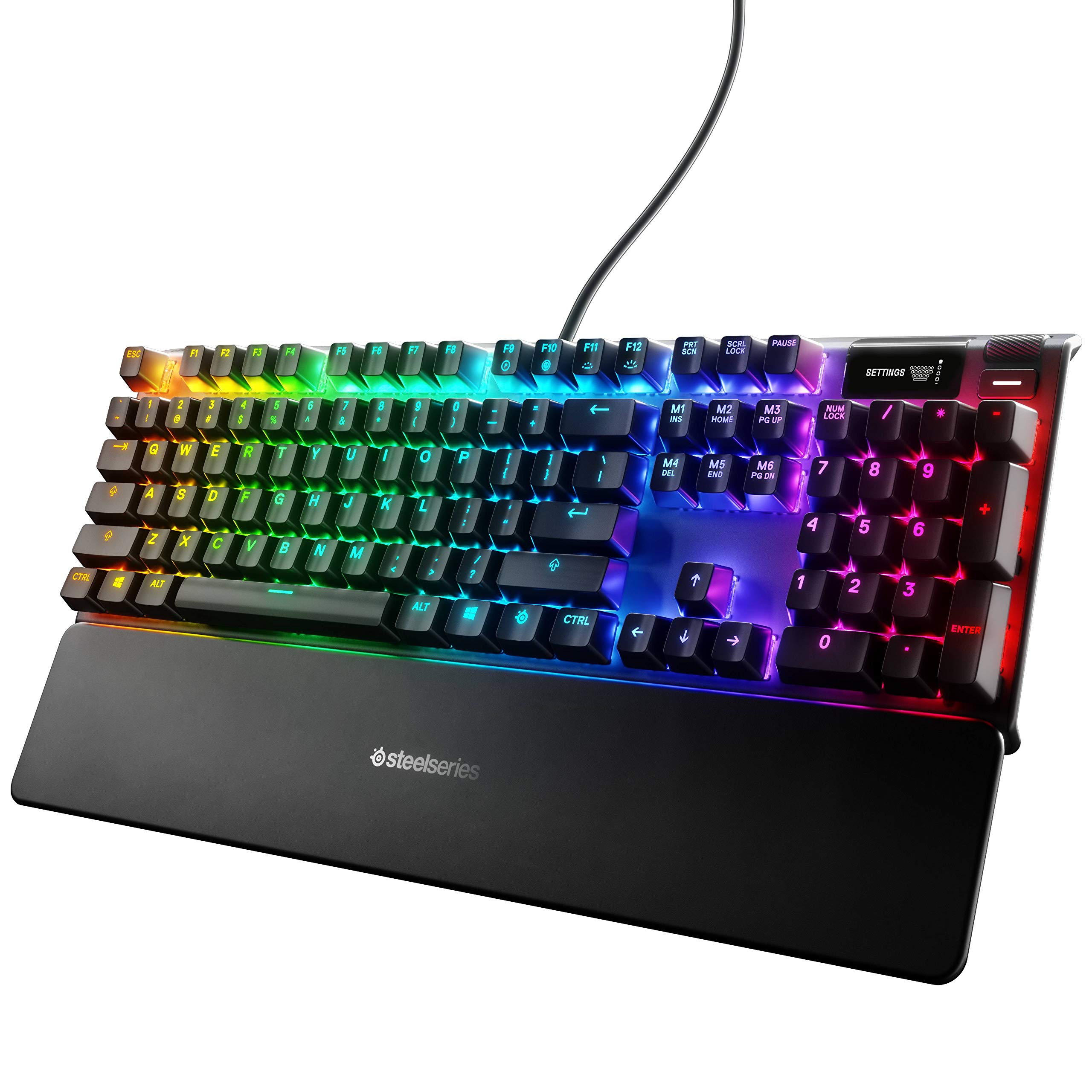
- Full-size mechanical layout with tactile, clicky blue switches.
- OLED smart display and media controls.
- Per-key RGB, USB passthrough and magnetic wrist rest.
Best For: People who want a full-size mechanical keyboard with clicky switches, display and wrist support.
SteelSeries Apex 9 TKL
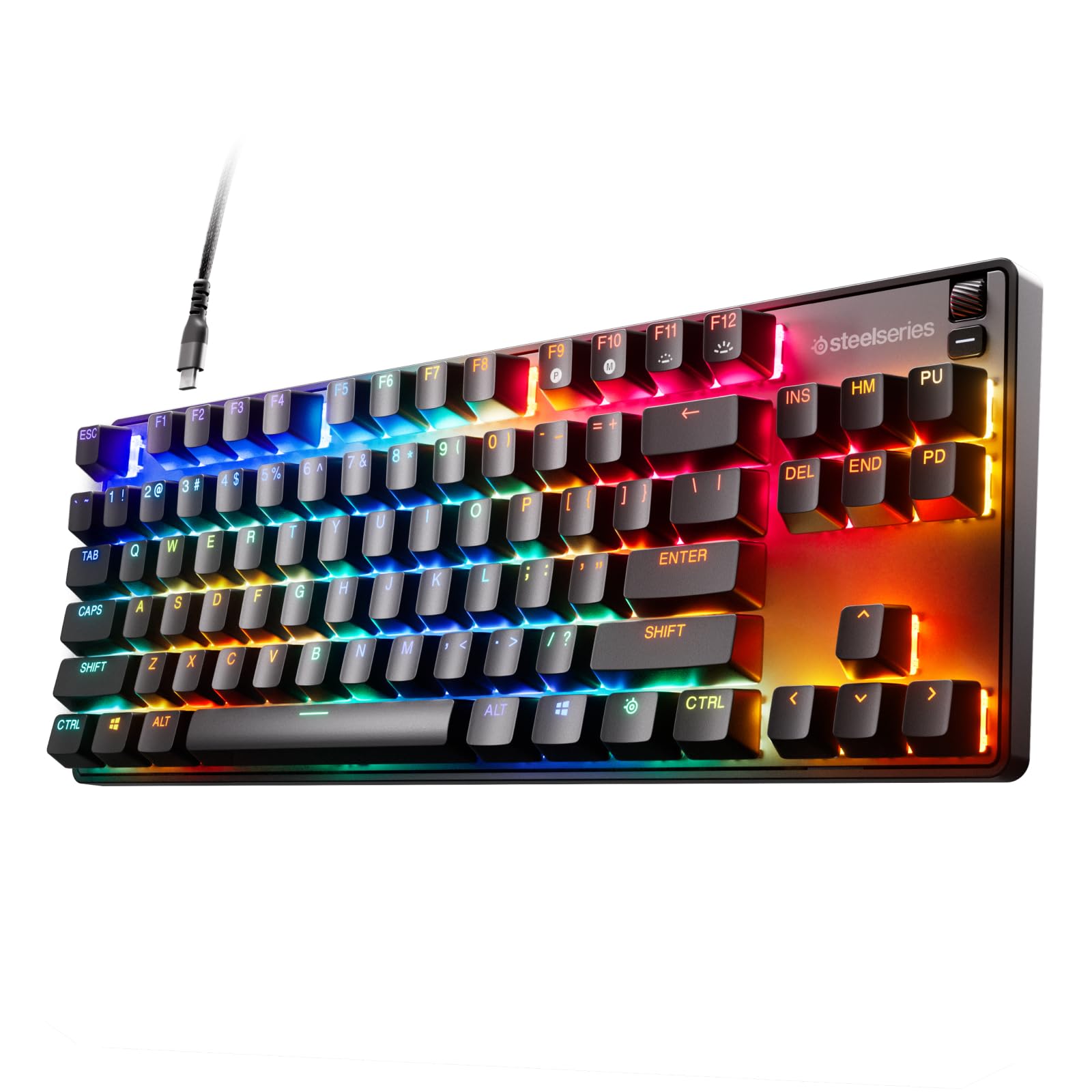
- Tenkeyless layout saves desk space.
- Optical switches offer 1 mm and 1.5 mm actuation settings.
- Replaceable switches, double-shot PBT keycaps and aluminum alloy frame.
Best For: Workers who want a compact keyboard with adjustable optical switch actuation and replaceable switches.
SOLAKAKA A75 Wireless Keyboard
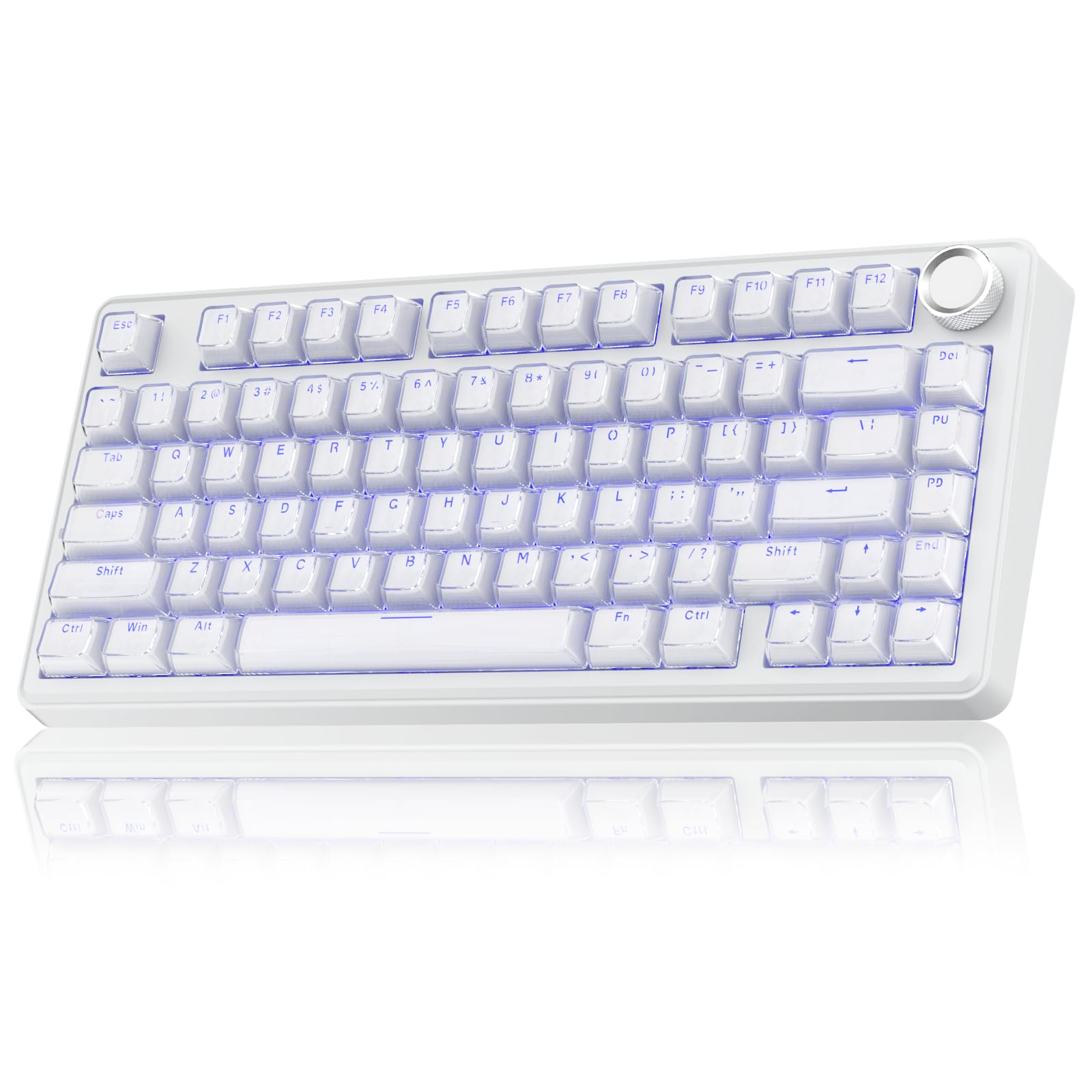
- 81-key layout retains arrow keys while saving desk space.
- Bluetooth, 2.4 GHz and USB-C connections; supports up to five devices.
- Hot-swappable switches and a multifunction office and gaming knob.
Best For: Workers who want a compact mechanical keyboard with wireless options and a volume and lighting knob.
SOLAKAKA KI99 Pro Silent
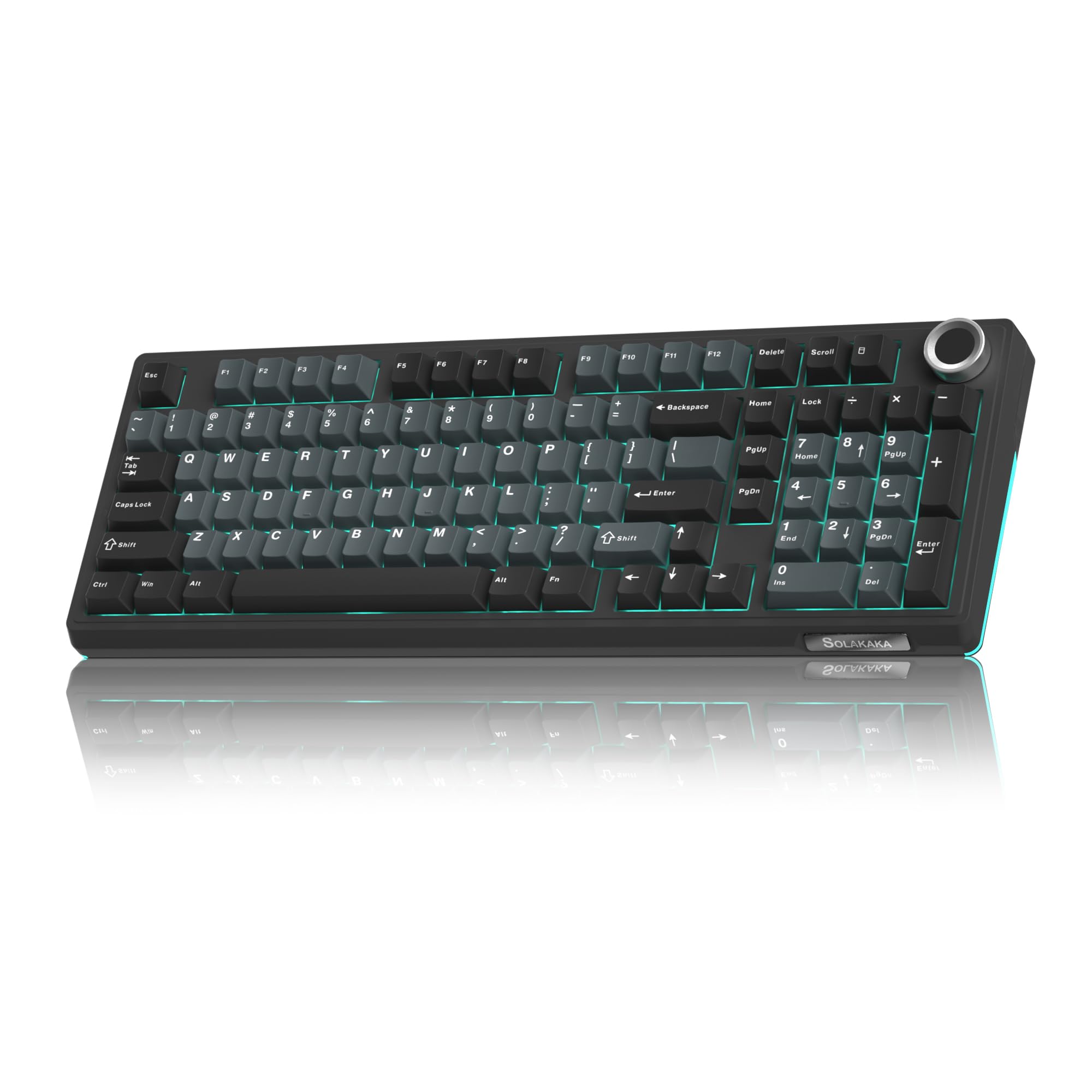
- 96% layout keeps a numeric keypad and saves desk space.
- Silent switches, gasket structure and five noise-reducing layers.
- Bluetooth, 2.4 GHz and Type-C wired connections.
Best For: Workers who want a quiet mechanical feel, a number pad and wireless connectivity.
Full-Size Wireless Workstation
JLab, Epic, Wireless Keyboard, Bluetooth 5.2, USB Dongle, Multi-Device, Backlit, 108 Keys, Black
The JLab Epic combines a 108-key full-size layout with a metal base, soft-touch keys and backlighting across the keys. Its Bluetooth 5.2 connection can pair with up to three devices, and a USB wireless dongle offers another connection option.
A built-in media knob provides direct volume control, while the rechargeable 2,000 mAh battery supports extended work sessions. The layout keeps the number pad available for spreadsheet work and data entry.
It is a practical fit for a shared desk or low-light workspace, though its soft-touch typing feel differs from a mechanical keyboard.
Best For: People who want a quiet full-size keyboard with backlighting and easy device switching.
| Pros | Cons |
|---|---|
|
|
Choose the Epic if you want full-size keys, backlighting and device switching in one work keyboard. Its three-device Bluetooth pairing and USB dongle option can accommodate a multi-device desk, while the media knob keeps volume adjustments close at hand.
The 2,000 mAh battery is rechargeable, but a usage-based runtime is not specified. If you need a low-profile board with a stated wireless runtime, consider the JBuds instead; if you want switch customization, look to the mechanical options.
Slim Multi-Device Number Pad
JLab JBuds Wireless Keyboard, 95 Key, Multi-Device Bluetooth and USB dongle, Soft Touch Keys, Media knob, Custom Profiles, Black
The JLab JBuds uses a 95-key layout that keeps a full numerical pad in a slim design. Its soft-touch keys are intended for quiet typing, and a smart media knob provides volume and playback control.
Connect through Bluetooth 5.2 to two devices or use the USB wireless dongle, then toggle among up to three connections. The rechargeable battery is rated for up to 30 days of wireless use, though actual runtime depends on use.
Windows, macOS, Android and iOS compatibility helps when the same keyboard serves a computer and mobile devices. Check which connection method works best with your setup.
Best For: Desk workers who want a compact, quiet layout with a number pad and multiple device connections.
| Pros | Cons |
|---|---|
|
|
The JBuds fits a desk that needs numeric entry without taking up as much space as a conventional full-size keyboard. Its soft-touch keys and media knob keep everyday work simple, while multiple connection options help when switching among a computer, tablet or phone.
Choose it over the Epic if you prefer a slimmer 95-key board and value its stated up-to-30-day battery rating. Check whether your desk needs key backlighting, which is not specified for this model.
Quiet Typing With Palm Support
SteelSeries Apex 3 RGB Gaming Keyboard – 10-Zone RGB Illumination – IP32 Water Resistant – Premium Magnetic Wrist Rest (Whisper Quiet Gaming Switch)
The SteelSeries Apex 3 uses whisper-quiet switches and includes a magnetic wrist rest for palm support during longer sessions. Its IP32 water resistance is designed to help prevent damage from accidental liquid spills, a useful consideration around drinks.
Ten-zone RGB illumination adds lighting control, while dedicated multimedia controls handle volume and settings. The keyboard connects to computers and several consoles, so it can serve a work-and-play setup.
Its feature set leans toward a full desk footprint rather than a compact layout. Consider whether you want the included wrist rest and quiet key feel before choosing among the simpler office-focused wireless models.
Best For: People who want a quiet wired keyboard with a wrist rest and spill resistance for a busy desk.
| Pros | Cons |
|---|---|
|
|
Choose the Apex 3 if quiet typing, a wrist rest and spill resistance matter more than wireless use or a reduced footprint. Its dedicated media controls are convenient for a computer that also handles entertainment, and the 10-zone lighting can be adjusted to suit a desk setup.
The Apex 3 TKL has a smaller tenkeyless layout and similar quiet-switch focus, but omits the wrist-rest detail in its product information. Check the available desk space and whether you want a number pad.
Compact Spill-Resistant Board
SteelSeries Apex 3 TKL RGB Gaming Keyboard – Tenkeyless Compact Form Factor - 8-Zone RGB Illumination – IP32 Water & Dust Resistant – Whisper Quiet Gaming Switch – Gaming Grade Anti-Ghosting,Black
The SteelSeries Apex 3 TKL trims the layout to a tenkeyless form, which can free desk space for a mouse or documents. Its whisper-quiet switches are rated for over 20 million keypresses, and anti-ghosting technology supports accurate key registration.
IP32 water and dust resistance is designed to help prevent damage from liquids and dust particles. A clickable volume roller and dedicated media keys make common audio adjustments accessible.
Eight-zone RGB lighting adds customization. This model suits workspaces where reduced width and quieter keys matter; choose a full-size alternative if you regularly use a numeric keypad.
Best For: Workers who want a quieter, smaller keyboard with spill and dust resistance.
| Pros | Cons |
|---|---|
|
|
The Apex 3 TKL is a good fit when desk width is limited but you still want quiet switches, media controls and spill resistance. Its smaller layout trades away a dedicated number pad, so spreadsheet-heavy workflows may be better served by the full-size Apex 3 or a JLab model.
The eight-zone RGB lighting provides less per-key adjustment than the Apex 5. Check whether you need the number pad daily and whether a wired setup fits your desk.
Tactile Feedback With OLED Controls
SteelSeries USB Apex 5 Hybrid Mechanical Gaming Keyboard – Per-Key RGB Illumination – Aircraft Grade Aluminum Alloy Frame – OLED Smart Display (Hybrid Blue Switch)
The SteelSeries Apex 5 pairs hybrid blue switches with tactile, clicky feedback, making it a distinctive choice for people who prefer clear key response. Its OLED smart display can show customizable content such as game information, Discord messages or GIFs.
Per-key RGB illumination offers more granular lighting than zone-based models, and the magnetic wrist rest adds palm support. An aircraft-grade aluminum alloy frame completes the feature set.
The product title gives a 900 by 300 millimeter size, so measure your available desk area before buying. Its clicky switches may be less suitable for quiet shared offices.
Best For: Workers who like a tactile, clicky keyboard and want per-key lighting and a display.
| Pros | Cons |
|---|---|
|
|
Choose the Apex 5 if you value tactile, clicky key feedback and want an OLED display as part of your desk setup. Per-key RGB and a wrist rest give it more customization and palm support than simpler office-focused boards.
That feature set comes with a larger footprint, and the clicky switches make it a less natural match for noise-sensitive offices than the quiet Apex 3 models. Measure for the stated 900 by 300 millimeter size and consider who shares your workspace.
Compact Mechanical Layout With Display
SteelSeries Apex 7 TKL Compact Mechanical Gaming Keyboard – OLED Smart Display – USB Passthrough and Media Controls – Linear and Quiet – RGB Backlit (Red Switch)
The SteelSeries Apex 7 TKL combines a compact tenkeyless layout with red switches described as linear and quiet. Its OLED smart display provides access to on-the-fly information from supported sources, and media controls make adjustments readily accessible.
A USB passthrough is included, while per-key RGB lighting and a magnetic wrist rest add desk customization and palm support. The TKL shape gives up the dedicated number pad to reduce keyboard width.
This is a work option for someone who prefers a mechanical switch and wants extra controls, but check the connection and software requirements for your computer.
Best For: Workers who want a tenkeyless mechanical keyboard with quiet linear switches and a wrist rest.
| Pros | Cons |
|---|---|
|
|
The Apex 7 TKL suits a desk where a number pad is expendable but mechanical keys and quick access to controls are welcome. Its red switches are identified as linear and quiet, a more work-friendly description than the clicky blue switches on the full-size Apex 7.
The OLED display and USB passthrough offer additional conveniences, while the wrist rest supports palm contact. Confirm that the TKL layout fits your spreadsheet habits and that your intended software works with the display.
Full-Size Mechanical With Clicky Switches
SteelSeries Apex 7 Mechanical Gaming Keyboard – OLED Smart Display – USB Passthrough and Media Controls – Tactile and Clicky – RGB Backlit (Blue Switch)
The SteelSeries Apex 7 is a full-size mechanical keyboard with tactile, clicky blue switches, an OLED smart display and per-key RGB illumination. Its magnetic wrist rest provides palm support, and media controls and USB passthrough add useful desk functions.
The full-size layout keeps number-pad access available for data entry and spreadsheets. The clicky switch feel is a matter of preference and produces a more pronounced typing sound than the quiet options in this group.
Consider your work environment and desk space before choosing it, especially if you share an office or need a quieter keyboard.
Best For: People who want a full-size mechanical keyboard with clicky switches, display and wrist support.
| Pros | Cons |
|---|---|
|
|
Choose the Apex 7 if you want a full-size layout and prefer tactile, clicky mechanical switches. The OLED display, media controls, USB passthrough and wrist rest give it a broad set of desk features, but the pronounced key feel may not suit a shared or quiet workspace.
If you like the Apex 7 feature mix but need to reduce keyboard width, the TKL variant has linear, quiet red switches and drops the number pad. Confirm which switch character and layout fit your workday.
Hot-Swappable Optical TKL
SteelSeries New Apex 9 TKL – HotSwap Optical Mini Keyboard – TKL Esports Design – Optical Switches – RGB Customization – Aluminum Alloy Frame – Double Shot PBT Keycaps
The SteelSeries Apex 9 TKL uses a tenkeyless layout and optical switches with two selectable actuation depths: 1 millimeter for a lighter press or 1.5 millimeters for a more deliberate one. Its switches are replaceable, and the double-shot PBT keycaps are designed to resist fading.
An aluminum alloy frame and RGB customization round out the compact design. These features may appeal to someone who wants to tune key response or maintain a switch-customizable board.
The TKL layout omits a dedicated number pad, and the product details focus on gaming-oriented responsiveness, so consider whether those priorities match your office work.
Best For: Workers who want a compact keyboard with adjustable optical switch actuation and replaceable switches.
| Pros | Cons |
|---|---|
|
|
The Apex 9 TKL is for someone who wants a compact board and values adjustable actuation plus replaceable optical switches. Those features can make the key response more configurable than the fixed switch options on the quiet office boards.
It sacrifices the number pad and its feature emphasis is oriented toward rapid input. For general office use, compare that flexibility with the quieter, simpler Apex 3 TKL; check whether the specific actuation choices and layout support your daily tasks.
Compact Wireless Mechanical With Knob
SOLAKAKA A75 Wireless Gaming Keyboard with Multifunction Knob, BT5.0/2.4GHz/USB-C, 75% Mechanical Keyboard, Hot-Swappable, Gasket Creamy Keyboard with RGB Backlit, Crystal Keycaps, for PC/Mac/PC
The SOLAKAKA A75 has an 81-key, 75% layout that keeps arrow keys while reducing the keyboard's footprint. It supports Bluetooth 5.0, 2.4 GHz wireless and USB-C wired connections, and can support up to five devices.
A multifunction knob changes roles between gaming and office modes, including volume adjustment and lighting control. The gasket structure and five-layer filling are designed to soften the typing feel and reduce internal noise.
Hot-swappable 3-pin and 5-pin switches allow customization without soldering. Its compact layout omits the number pad, and the lighting and software features may be more than a straightforward office setup needs.
Best For: Workers who want a compact mechanical keyboard with wireless options and a volume and lighting knob.
| Pros | Cons |
|---|---|
|
|
Choose the A75 if you want a compact mechanical keyboard that can connect wirelessly or by USB-C, and you appreciate having arrow keys and a physical control knob. Its switch hot-swap support and gasket structure add customization options that basic office boards lack.
The tradeoff is the missing number pad and the extra complexity of lighting and programmable settings. If numeric entry is central to your work, pick a full-size option; if you need a compact but more conventional wireless board, the JLab JBuds keeps the number pad in a slimmer design.
Quiet Wireless Mechanical Number Pad
SOLAKAKA KI99 Pro Wireless Mechanical Keyboard with Quiet Switch, Hot Swappable Pre-Lubed Switches with RGB Backlit, Gasket Structure Computer Gaming Keyboard (BlackBlue, Silent Switch)
The SOLAKAKA KI99 Pro Silent uses a 96% layout that retains a numeric keypad while taking less desk space than a conventional full-size keyboard. It offers Bluetooth 5.0, 2.4 GHz wireless and Type-C wired connections, with a 10,000 mAh battery.
Silent switches, a gasket structure and five noise-reducing layers are designed for quieter typing. A control knob adjusts volume, media and lighting, while hot-swappable 3-pin and 5-pin switches allow changes without soldering.
PBT keycaps and programmable software add customization. This model fits a work desk where key noise matters, although its mechanical features may be more involved than necessary for simple office tasks.
Best For: Workers who want a quiet mechanical feel, a number pad and wireless connectivity.
| Pros | Cons |
|---|---|
|
|
The KI99 Pro Silent is the mechanical pick for someone who needs both a numeric keypad and a quieter typing profile. Its three connection modes and 10,000 mAh battery support flexible placement, while the knob and hot-swap switches add controls and customization.
Its advantage over the A75 is the number pad and stated silent switch configuration; the A75 is smaller and keeps arrow keys. Check the keyboard's dimensions for your desk, and decide whether you will use the customization features.
How to Choose Keyboards For Work
How We Picked Keyboards for Work
This selection weighs how each keyboard fits common desk tasks: quiet typing, numeric entry, device switching, compactness and practical controls. Quiet options include the SteelSeries Apex 3 models and the silent-switch SOLAKAKA KI99 Pro.
For number-heavy work, the full-size JLab Epic and SteelSeries Apex 7 keep a number pad, while the JLab JBuds offers a slimmer 95-key layout with a numerical pad.
Mechanical models earn a place where their specific features support a clear work setup. The SOLAKAKA KI99 Pro Silent combines a compact number-pad layout with multiple connections, while the SteelSeries Apex 7 TKL and Apex 9 TKL reduce width.
Each has a different switch or customization emphasis. Duplicate offers for the same model and layout are represented once.
Comparing Work Keyboard Layouts and Switches
Start with the keys you use most. A dedicated number pad can speed up spreadsheet entry, but it takes room; the Apex 3 TKL and Apex 7 TKL trade it away to leave a narrower footprint.
The A75 is more compact still, retaining arrow keys in an 81-key layout. If quiet typing matters, the Apex 3 models have whisper-quiet switches, while the KI99 Pro Silent combines silent switches with a gasket structure and noise-reducing layers.
The Apex 5 and full-size Apex 7 use clicky switches, which may be a poor fit for shared offices.
Mechanical feel varies, so consider whether you want linear, quiet keys, tactile clicks or switch customization. The Apex 7 TKL uses linear, quiet red switches; the Apex 5 and Apex 7 use tactile, clicky blue switches.
The Apex 9 TKL offers two optical actuation depths and replaceable switches. The A75 and KI99 Pro Silent allow hot-swapping compatible 3-pin and 5-pin switches.
These distinctions matter more than RGB lighting for most work tasks.
| Product | Standout features | Best for |
|---|---|---|
| JLab Epic Wireless KeyboardCheck Price |
| People who want a quiet full-size keyboard with backlighting and easy device switching. |
| JLab JBuds Wireless KeyboardCheck Price |
| Desk workers who want a compact, quiet layout with a number pad and multiple device connections. |
| SteelSeries Apex 3Check Price |
| People who want a quiet wired keyboard with a wrist rest and spill resistance for a busy desk. |
| SteelSeries Apex 3 TKLCheck Price |
| Workers who want a quieter, smaller keyboard with spill and dust resistance. |
| SteelSeries Apex 5Check Price |
| Workers who like a tactile, clicky keyboard and want per-key lighting and a display. |
| SteelSeries Apex 7 TKLCheck Price |
| Workers who want a tenkeyless mechanical keyboard with quiet linear switches and a wrist rest. |
| SteelSeries Apex 7Check Price |
| People who want a full-size mechanical keyboard with clicky switches, display and wrist support. |
| SteelSeries Apex 9 TKLCheck Price |
| Workers who want a compact keyboard with adjustable optical switch actuation and replaceable switches. |
| SOLAKAKA A75 Wireless KeyboardCheck Price |
| Workers who want a compact mechanical keyboard with wireless options and a volume and lighting knob. |
| SOLAKAKA KI99 Pro SilentCheck Price |
| Workers who want a quiet mechanical feel, a number pad and wireless connectivity. |
Choosing Wireless Connectivity and Desk Controls
If you regularly move between a laptop, tablet and phone, compare connection methods and device limits. The JLab models support Bluetooth and a USB dongle, with toggling across up to three connections.
The SOLAKAKA A75 and KI99 Pro Silent add 2.4 GHz and USB-C wired modes and support multiple devices. Check operating-system compatibility and any software limits before relying on macros or key remapping.
For example, the A75 software is specified for Windows and wired use.
A volume knob or roller can help when calls and media are part of the workday. The JLab Epic and JBuds have media knobs, while the Apex 3 TKL includes a clickable volume roller.
The SOLAKAKA models use knobs for volume and lighting, depending on mode. Backlighting can help in dim rooms, but a keyboard with extensive RGB controls may require extra setup.
Choose the simplest controls that serve your routine.
Who Should Buy Which Keyboard for Work?
Choose the JLab Epic for full-size typing with backlighting and multi-device connections. The slimmer JBuds suits a desk that needs a number pad but benefits from a reduced width.
For quieter wired typing with a wrist rest, consider the Apex 3; pick the Apex 3 TKL when saving space matters more than keeping the number pad.
For a wireless mechanical keyboard with a number pad and quieter switches, the KI99 Pro Silent is the most directly tailored option here. The A75 suits someone who wants arrow keys in a smaller layout and likes switch customization.
Choose the Apex 7 TKL for linear mechanical switches, an OLED display and compact width. The full-size Apex 7 or clicky Apex 5 makes more sense if you specifically want tactile clicks and accept the extra sound and space.